What Is SnapTax Optimizer? The Complete Guide to Advanced Tax Planning Software for Freelancers
Crystal Harrison · September 21, 2026 · 21 min read
What Is SnapTax Optimizer? The Complete Guide to Advanced Tax Planning Software for Freelancers
What SnapTax Optimizer is, what it covers, and how it connects QBI, capital gains, retirement contributions, and home office deductions to one real-time quarterly tax estimate.
September 21, 2026 · 14 min read
TL;DR
Advanced tax planning software for freelancers exists in two worlds: platforms built for CPAs and financial advisors with workflows designed for professional advisory practices, and basic expense trackers that do the math once in April. SnapTax Optimizer is designed for a gap some freelancers find between those two options - a self-serve platform intended to let users model QBI scenarios, home office method comparisons, retirement contribution scenarios, and capital gains scenarios, and see how those decisions may affect their projected annual tax and remaining estimated-tax payments. If you have a home office, brokerage account, retirement plan, multiple income sources, or deductions that require separate calculations, those are the planning areas worth understanding before each quarterly deadline.
Advanced tax planning for freelancers isn't complicated. But it is different from tracking expenses - and that difference is worth understanding before the next quarterly deadline.
Advanced tax planning software exists in two completely separate worlds.
The first is built for CPAs and financial advisors - platforms like BNA Income Tax Planner, Holistiplan, and RightCapital, with workflows designed for professional advisory practices managing dozens of clients. The second world is where most freelancers live: basic expense trackers, one-shot quarterly calculators, and filing software that does the math once in April and calls it done.
Some freelancers find a gap between professional-advisor tools and basic trackers - something designed for a freelancer who wants to model a SEP-IRA contribution scenario before they make it, see how selling a stock might affect projected annual tax, or compare home office methods before filing.
SnapTax Optimizer is designed for that gap - advanced tax planning software for the independent contractor, the consultant, the self-employed professional who wants to model significant financial decisions and see how they may affect projected annual tax and remaining estimated-tax payments. Organizing these scenarios in one place does not replace a tax professional for complex situations, but it can help freelancers arrive at filing season with far better records and clearer numbers.
What makes tax planning "advanced" for a freelancer?
Advanced tax planning for freelancers means going beyond expense tracking to model decisions that reduce taxable income before the year ends. That includes QBI deductions, retirement contributions, investment timing, home office method selection, and vehicle deduction comparisons - made before each quarterly deadline, not after the year closes.
The IRS allows eligible self-employed filers a deduction under Section 199A - a taxpayer with $65,000 of qualified business income may have a potential deduction of up to $13,000, subject to taxable-income limits, business type, SSTB rules, other income, and the full calculation. Some basic expense trackers do not calculate QBI at all. They categorize expenses and show a quarterly estimate. They don't model decisions.
That modeling is the entire point of advanced planning. A retirement contribution scenario run in October - with the projected annual tax impact visible before the money moves - is a planning decision. The same contribution entered into TurboTax in April is just recordkeeping. The deduction may be the same either way. But the freelancer who planned in October had better cash flow information all through Q4.
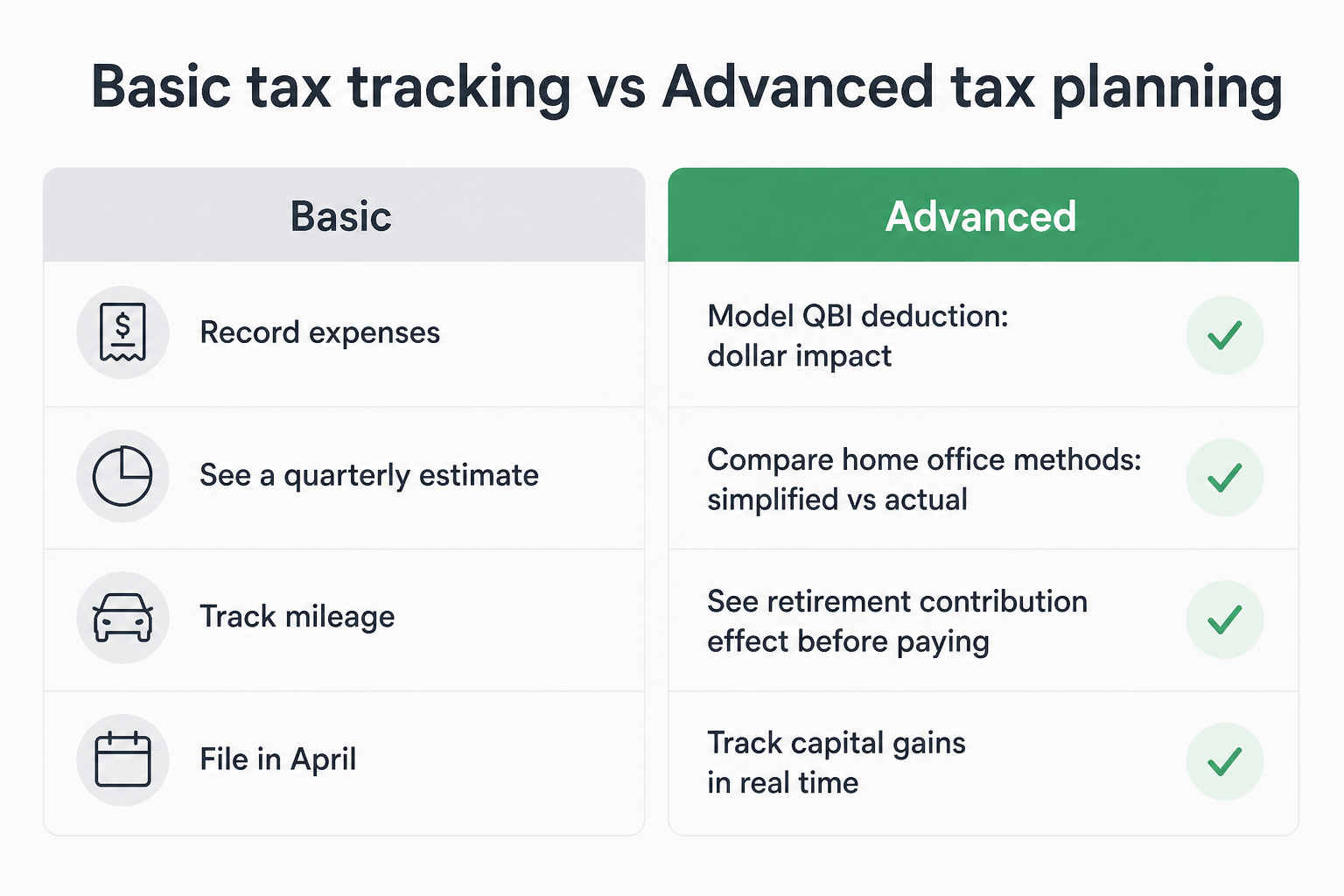
Here's the practical difference between the two approaches:
Basic: categorize expenses, track mileage, see a quarterly estimate
Advanced: model the QBI deduction (§199A) and see a projected dollar impact on taxable income (subject to full-return eligibility)
Advanced: compare home office simplified vs actual method to see which scenario produces a larger estimated deduction for your situation
Advanced: run a SEP-IRA contribution scenario and see how it may affect projected annual tax before transferring the money
Advanced: model selling an investment and see a projected capital gains tax impact before executing the trade
Advanced: compare mileage rate vs actual vehicle expenses to see which method produces a larger estimated deduction (first-year method, business-use percentage, and vehicle classification rules apply)
Advanced: organize home-rental facts under Section 280A - a valid deduction requires bona fide business purpose, fair-market rent, proper records, and appropriate entity structure
The switch from basic to advanced isn't about complexity. It's about timing. Advanced planning happens before the decision. Basic recordkeeping happens after.
What's the difference between a tax planning tool and a tax filing tool?
A tax filing tool prepares and submits your return after the year is over. A tax planning tool helps you make the decisions throughout the year that reduce what you'll owe when you file.
This sounds obvious, but many freelancers are using one and calling it the other. TurboTax Self-Employed, H&R Block, TaxAct - these are primarily designed for preparing an annual return. They're excellent at what they do. But they compile what already happened; they don't model what you could do differently before the next deadline.
A retirement contribution scenario run in September - showing how it may affect projected annual tax - is a planning decision. The same contribution entered into TurboTax in April is recordkeeping. The difference isn't the deduction - it's when you know about it.
Tax planning tool | Tax filing tool | |
|---|---|---|
When it's used | All year, before decisions | Once, after the year ends |
Primary function | Model decisions and project potential tax effects | Compile data, submit return |
Projected estimated-tax updates | Designed to update as income and confirmed scenarios change | Not applicable |
Deduction modeling | QBI, home office, retirement scenarios | Records confirmed deductions |
Investment decisions | Model before selling | Records completed sales |
Examples | TurboTax, H&R Block, TaxAct | |
Cost model | Monthly subscription | Per-filing fee |
The two tools serve different parts of the tax calendar. Planning happens January through December. Filing happens once. The best outcome uses both - a planning tool during the year, and filing software (or a CPA) at the end.
What does SnapTax Optimizer include?
SnapTax Optimizer is designed as the advanced tier of the SnapTax platform, built on top of the Builder plan's expense tracking, AI categorization, and P&L reporting. It is intended to add deduction scenario modeling and investment tracking for self-employed filers whose tax situations include more than simple Schedule C income.
The QBI deduction under Section 199A requires a separate calculation that some basic tools do not include at all. The home office actual method - which applies a business-use percentage to actual home expenses including mortgage interest, insurance, and utilities - can produce a larger deduction than the simplified method for some homeowners, though the right comparison depends on each taxpayer's specific expenses and business-use percentage. These aren't obscure deductions. They're just calculations that require more than a spreadsheet.
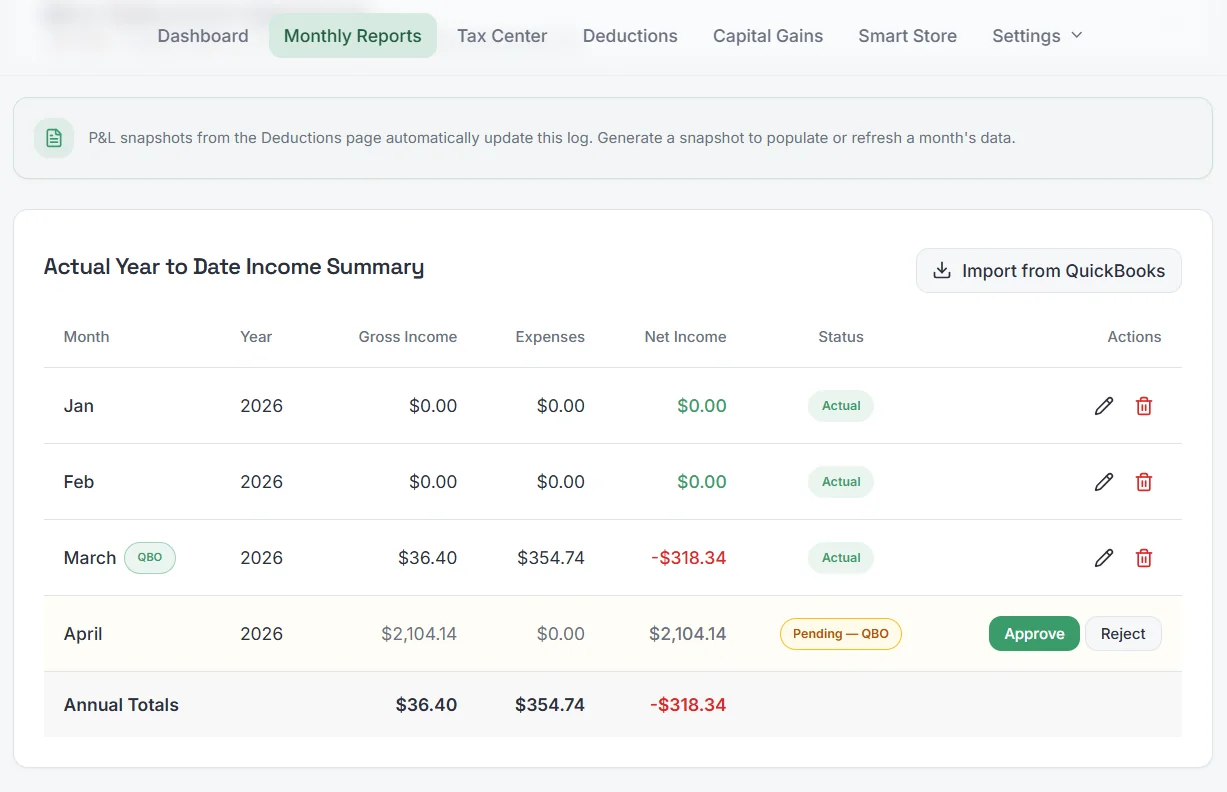
SnapTax Optimizer is designed to include:
QBI scenario tool (§199A) - designed to screen for eligibility, model the deduction, and apply income thresholds and SSTB (specified service trade or business) rules. The Section 199A deduction is generally claimed as a deduction below AGI, not as a direct reduction of Schedule C profit, and does not reduce the self-employment tax base. Actual deductible amount depends on taxable income, filing status, business type, and the full return. Source: IRS Publication 535
Home Office Calculator - designed to compare the simplified method ($5/sq ft, capped at $1,500) against the actual method (business-use percentage of home expenses including mortgage interest, insurance, and utilities) and show which scenario produces a larger estimated deduction. Source: IRS Publication 587
Capital Gains Tracker - designed to connect brokerage gains, dividends, and investment income to projected annual tax; includes sell scenario modeling before you execute a trade
Retirement and insurance deductions - designed to model SEP-IRA, Solo 401(k), and self-employed health insurance deduction scenarios. SEP-IRA contributions for sole proprietors are subject to a special self-employed calculation; the practical limit is generally about 20% of adjusted net self-employment earnings, subject to the annual IRS cap. A deductible $15,000 SEP-IRA contribution may reduce federal income tax by about $3,300 if the deduction falls in a 22% marginal federal bracket. It generally does not reduce self-employment tax. Actual savings can differ because of QBI, state tax, filing status, other income, and contribution-limit rules. Source: IRS Publication 560
Itemized vs standard deduction comparison - designed to model mortgage interest, SALT, charitable contributions, and medical expenses against your standard deduction threshold. The current SALT cap should be confirmed against IRS guidance at the time of filing before any planning decisions are made.
Section 280A home-rental planning (Augusta rule) - designed to help users organize facts for a potential home-rental arrangement. A valid deduction may require a bona fide business purpose, fair-market rent, proper records, appropriate entity structure, and professional review. It is not available to every freelancer or sole proprietor. Source: IRS Publication 527
Full spouse business tracking - designed to consolidate two businesses or a W-2 and 1099 household into one projected estimate
Multiple Business management - track expenses, mileage, receipts, assets, business reports and P&L's for multiple businesses in one tool. Give access to a spouse, bookkeeper, or CPA to any or all of your businesses. All businesses roll up to a single household to show a true quarterly tax liability for all businesses combined.
All Builder plan features - AI expense categorization, the "Is This Deductible?" wizard, mileage tracker, receipt management, asset depreciation, and real-time P&L (these are live in Builder today)
How do advanced planning decisions connect to your quarterly tax estimate?
A planning decision can change projected annual tax and may affect projected remaining estimated-tax payments. Required-payment and penalty exposure can also depend on safe-harbor rules, withholding, prior payments, and annualized-income calculations. Understanding that impact before a decision - not after the year closes - is the core value of a planning tool.
Quarterly estimated payments are based on projected annual tax liability. If a decision reduces projected annual tax by $8,000, it may reduce the amount a taxpayer chooses to reserve or pay later in the year. The timing and amount of required installments depend on the taxpayer's safe-harbor and payment history.
The problem is that most tools don't work this way. Filing software calculates after the year closes. Basic trackers show a single estimate that doesn't update as scenarios change.
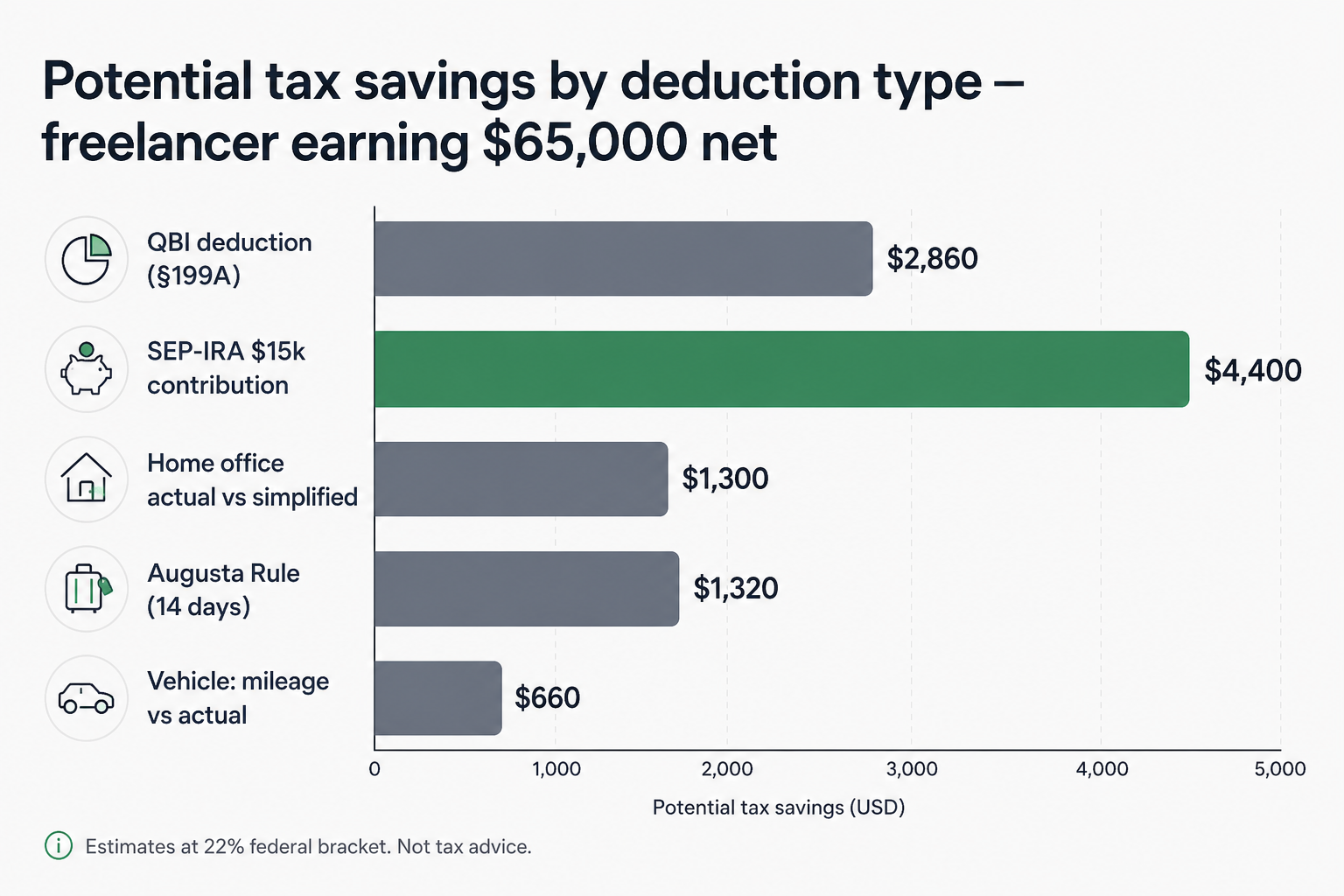
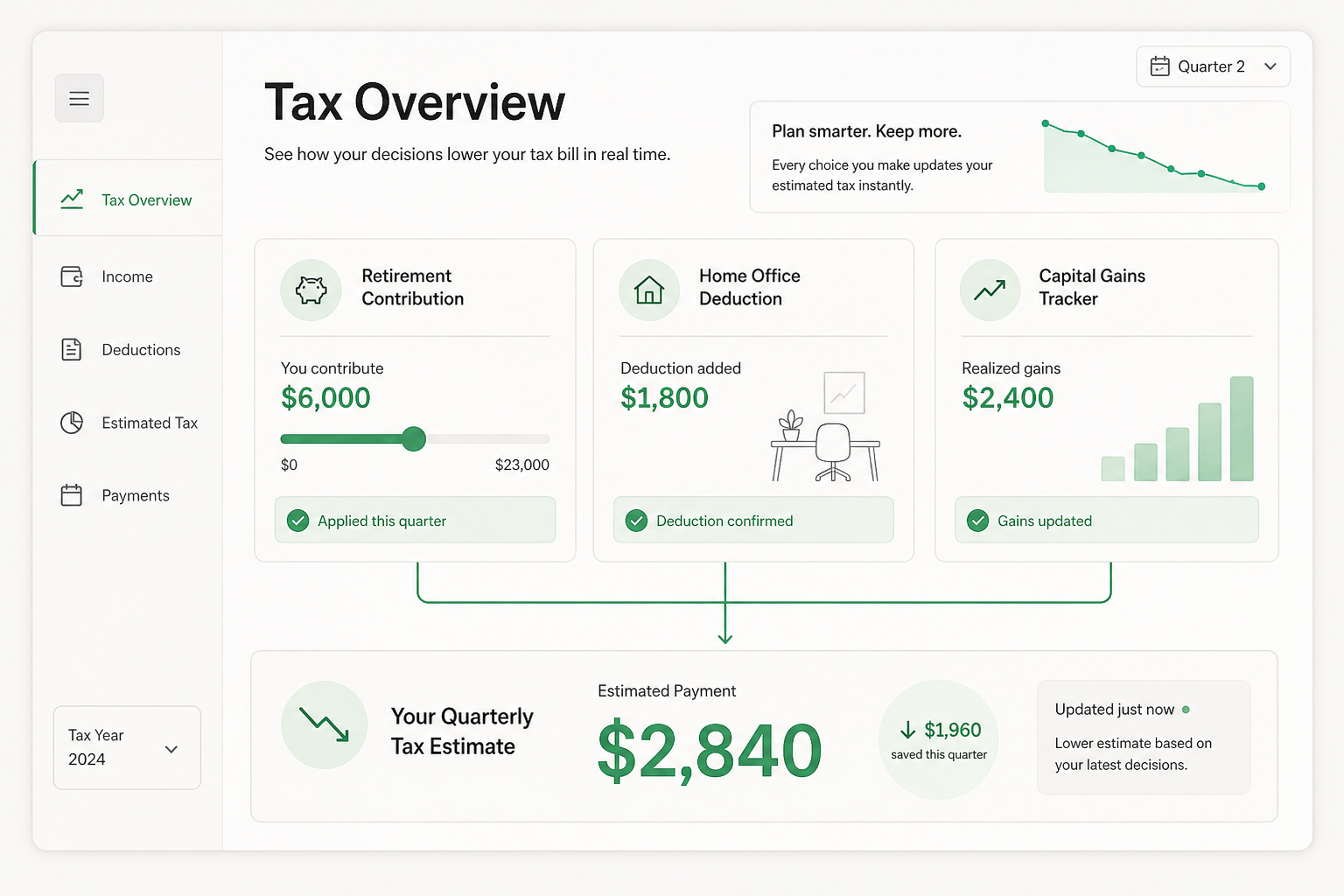
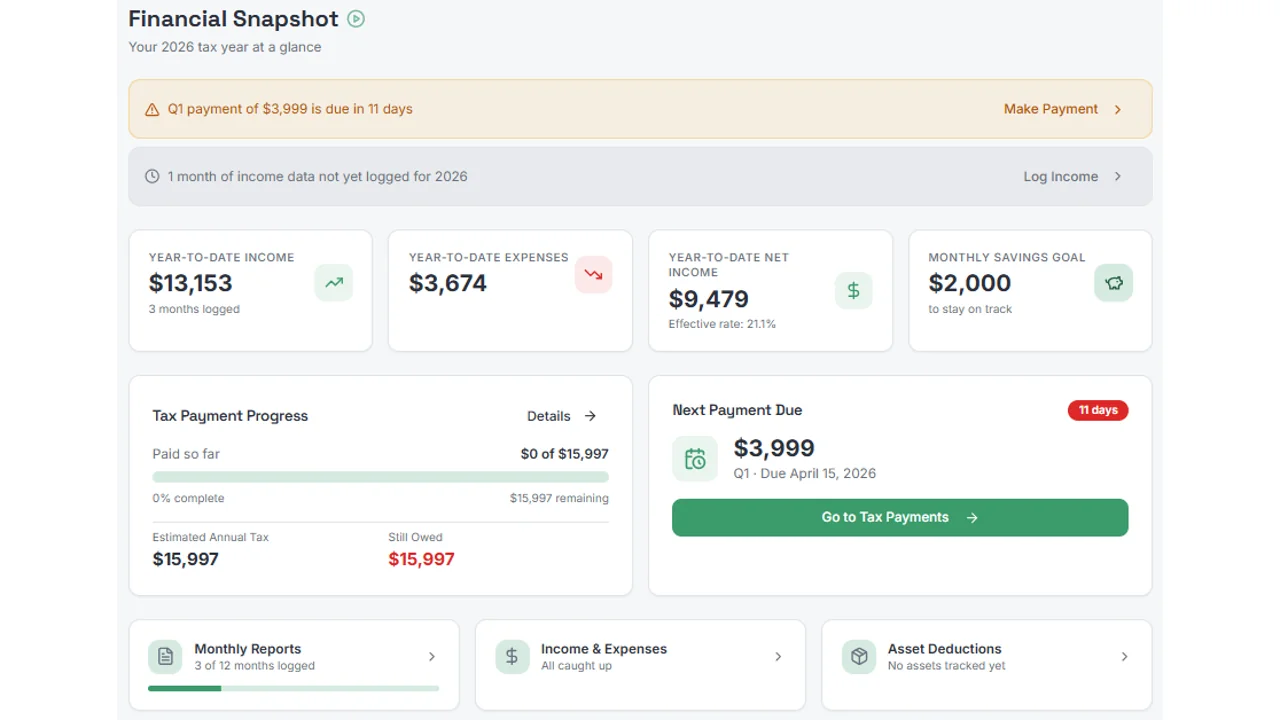
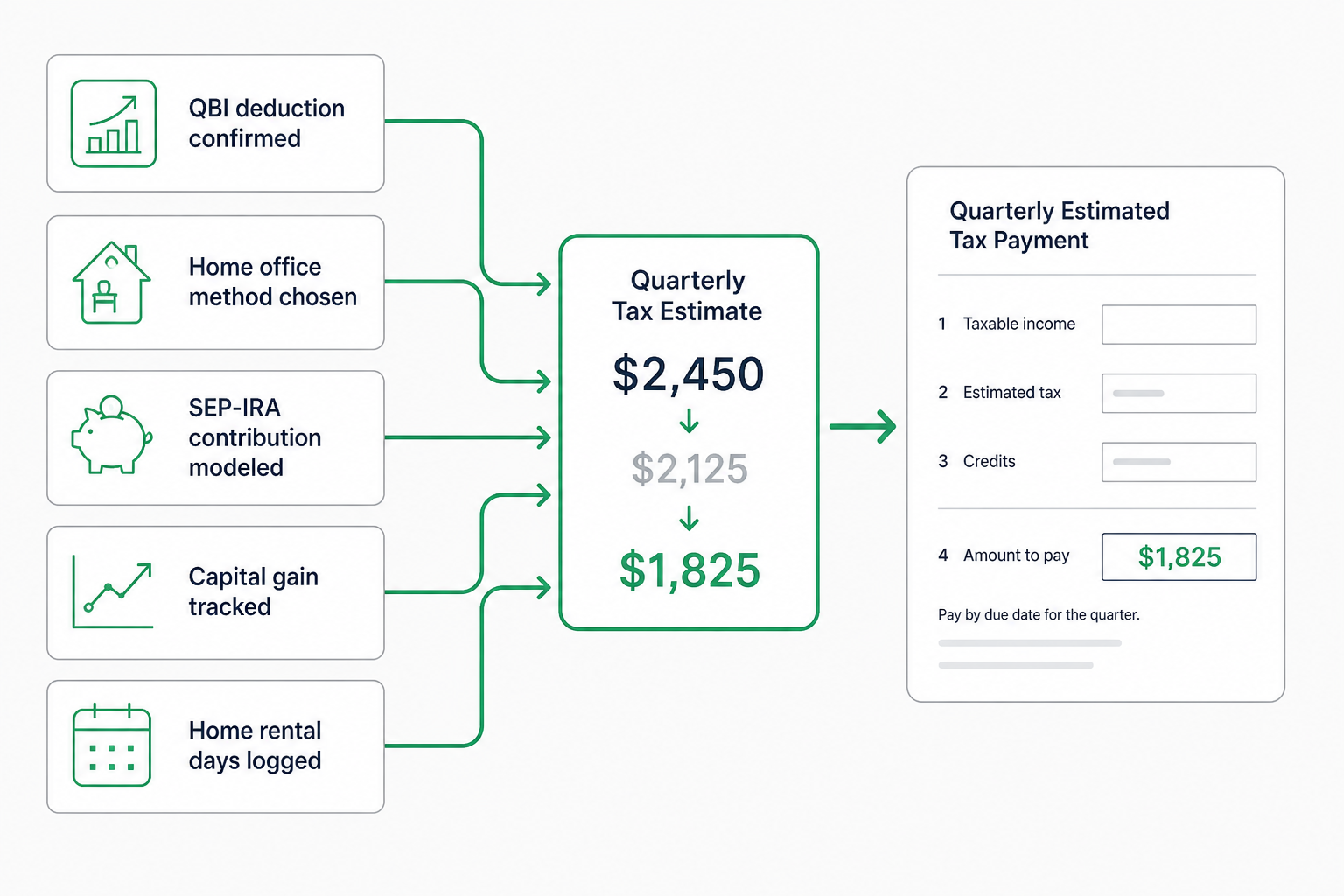
Here's what that projected-estimate connection is designed to look like inside SnapTax. When a confirmed scenario is added, the Tax Center is designed to recalculate projected annual tax and projected remaining estimated-tax payments based on the information entered. A SEP-IRA scenario, a home office method selection, a capital gains event - each is intended to feed into the same projection before any real decision is made.
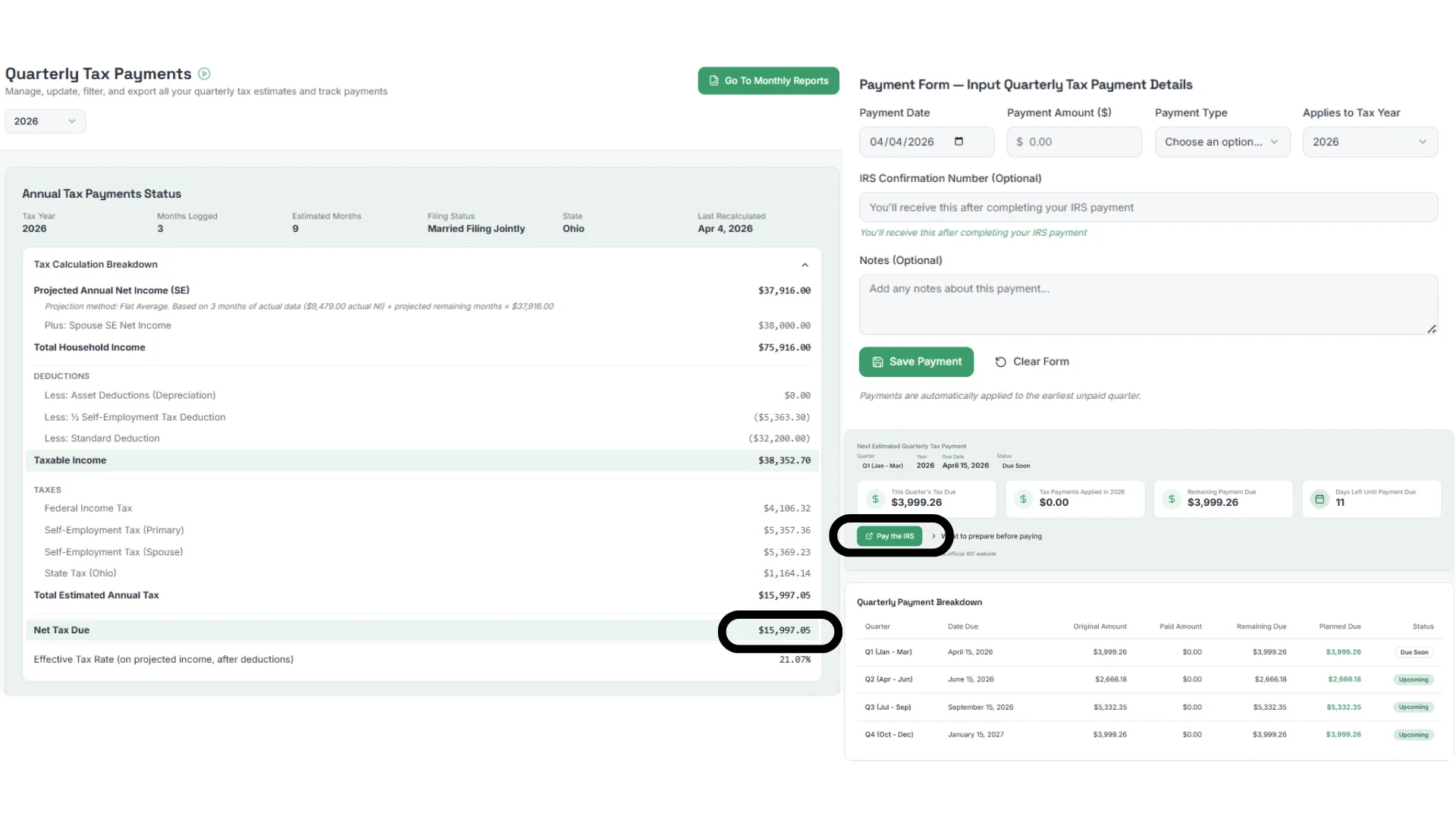
That connection - between planning scenarios and projected remaining payments - is what makes the planned SnapTax Optimizer advanced tax planning software rather than an advanced expense tracker. Required installment amounts and any penalty exposure still depend on safe-harbor rules and payment history, but having a current projection before each deadline is far more useful than discovering the numbers in April.
Who actually needs advanced tax planning software?
Advanced tax planning software pays for itself when your tax situation includes more than simple Schedule C income. Specifically when you have significant deductions that require calculation, investment income, retirement accounts, or multiple income sources.
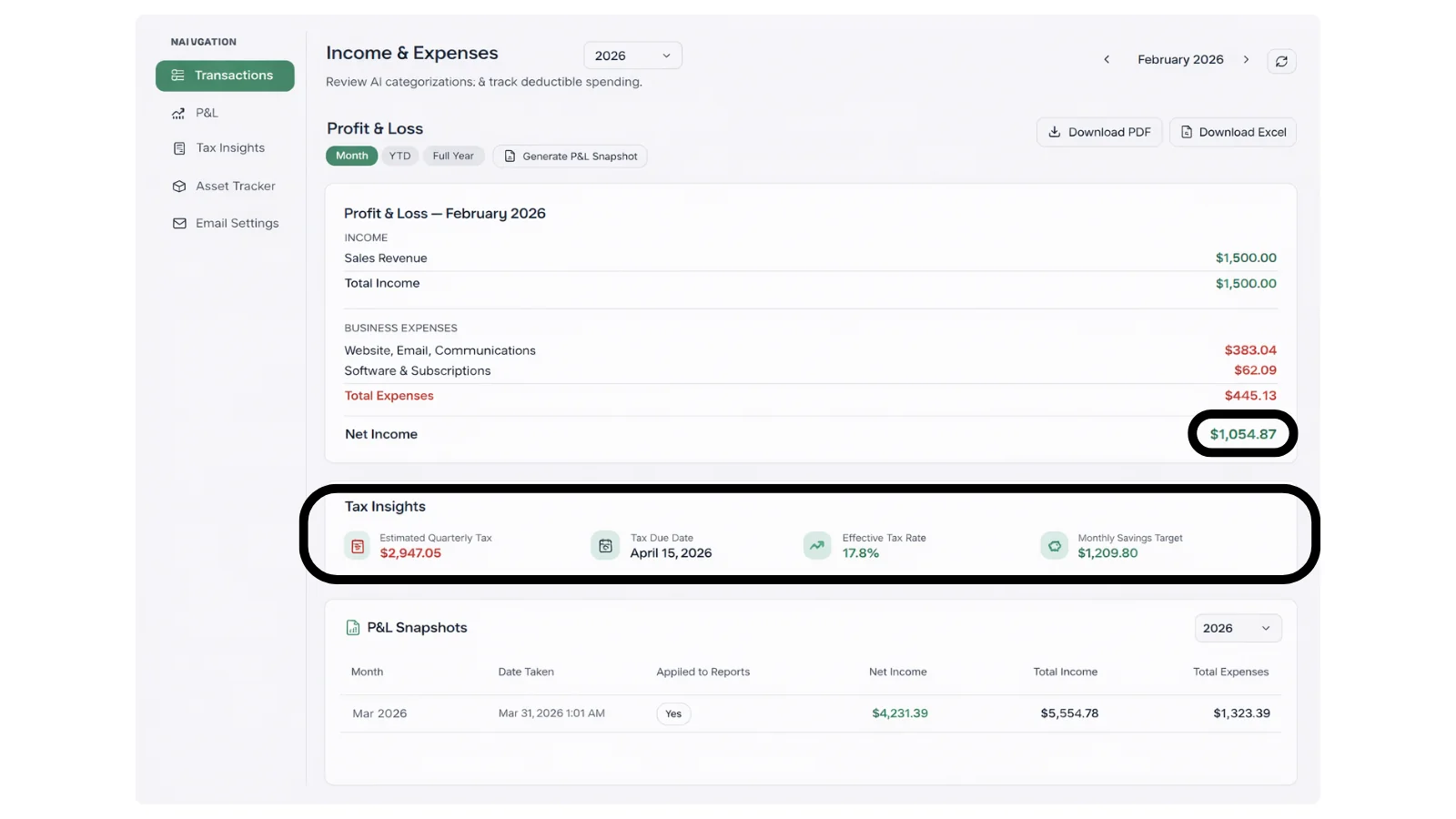
Example only: a taxpayer with $65,000 of qualified business income may have a potential Section 199A deduction of up to $13,000. If that deduction falls within a 22% marginal federal bracket, it could reduce federal income tax by up to about $2,860. Eligibility and actual savings depend on the taxpayer's full return, business type, SSTB rules, filing status, and other income. A home office, a vehicle used for business, and a brokerage account each add a separate planning area - and for taxpayers who qualify, any one of those areas may be worth modeling carefully before filing.
You likely need advanced tax planning software if:
You have meaningful self-employment income and deductions that require separate calculations (QBI eligibility, home office method, retirement contributions)
You work from a dedicated home office (the actual method vs simplified comparison is worth running every year)
You operate more than one Business
You have a vehicle used for business (mileage rate vs actual expenses needs annual comparison)
You have brokerage investments alongside freelance income (capital gains affect quarterly estimates)
You have or want a retirement account (SEP-IRA or Solo 401(k) contribution scenarios are worth modeling before you contribute - they can affect projected annual tax)
You have children or dependents (CDCC, ODC, or EITC eligibility depends on household income, filing status, and dependent information - worth modeling against your full income picture)
You own your home with significant mortgage interest (the itemized vs standard comparison is worth running)
You have more than one business or income source in the household
Basic tools are sufficient if:
Your freelance income is straightforward and under $30,000
You have no investments, retirement accounts, or home office
You rent and have minimal personal deductions beyond the standard deduction
You have a single business with simple Schedule C expenses only
The line isn't income - it's complexity. A freelancer earning $35,000 with a home office and a SEP-IRA has more to gain from advanced planning than a freelancer earning $80,000 with simple income and no deduction optimization.
How is SnapTax Optimizer different from TurboTax Self-Employed?
TurboTax Self-Employed is primarily designed for preparing an annual return. SnapTax Optimizer is designed as a planning tool that models tax scenarios throughout the year and connects them to projected estimated-tax payments before each IRS deadline.
This is a meaningful difference. TurboTax guides you through every deduction at filing time - it's thorough, well-designed, and handles the return accurately. But it operates on what already happened. A home office deduction you discover in TurboTax in April is a deduction you couldn't optimize during the year. A SEP-IRA contribution scenario run in SnapTax in August is one you can act on in September with a clearer picture of how it may affect projected annual tax.
A freelancer who uses SnapTax Optimizer during the year and arrives at filing season with organized P&L data and modeled deduction scenarios may spend less time on recordkeeping with their CPA - but accounting fee savings depend on the individual relationship and are not guaranteed.
SnapTax Optimizer (in Beta) | TurboTax Self-Employed | |
|---|---|---|
Primary purpose | Year-round scenario modeling | Annual return preparation |
Projected estimated-tax updates | Designed to update as scenarios change | Not applicable |
QBI deduction modeling | In Beta: guided scenario tool | At filing |
Capital gains tracking | In Beta: scenario modeling before you sell | At filing |
Retirement contribution modeling | In Beta: before you contribute | Not applicable |
Home office method comparison | In Beta: both methods, scenario comparison | At filing |
Section 280A home-rental planning | In Beta (eligibility requirements apply) | No |
When value is delivered | All year | Once at filing |
Starting price | ||
Multiple Businesses | Planned: Manage more than 1 business with a shared Household tax picture | Must file each business separately |
Use together? | Yes - plan with SnapTax, file with TurboTax | Yes |
The verdict: these tools aren't competing. TurboTax files your return. The planned SnapTax Optimizer is designed to help you understand and model what that return might look like before you get there. Some freelancers may find both useful - one during the year, one at filing.
What does the Deduction Optimizer actually do?
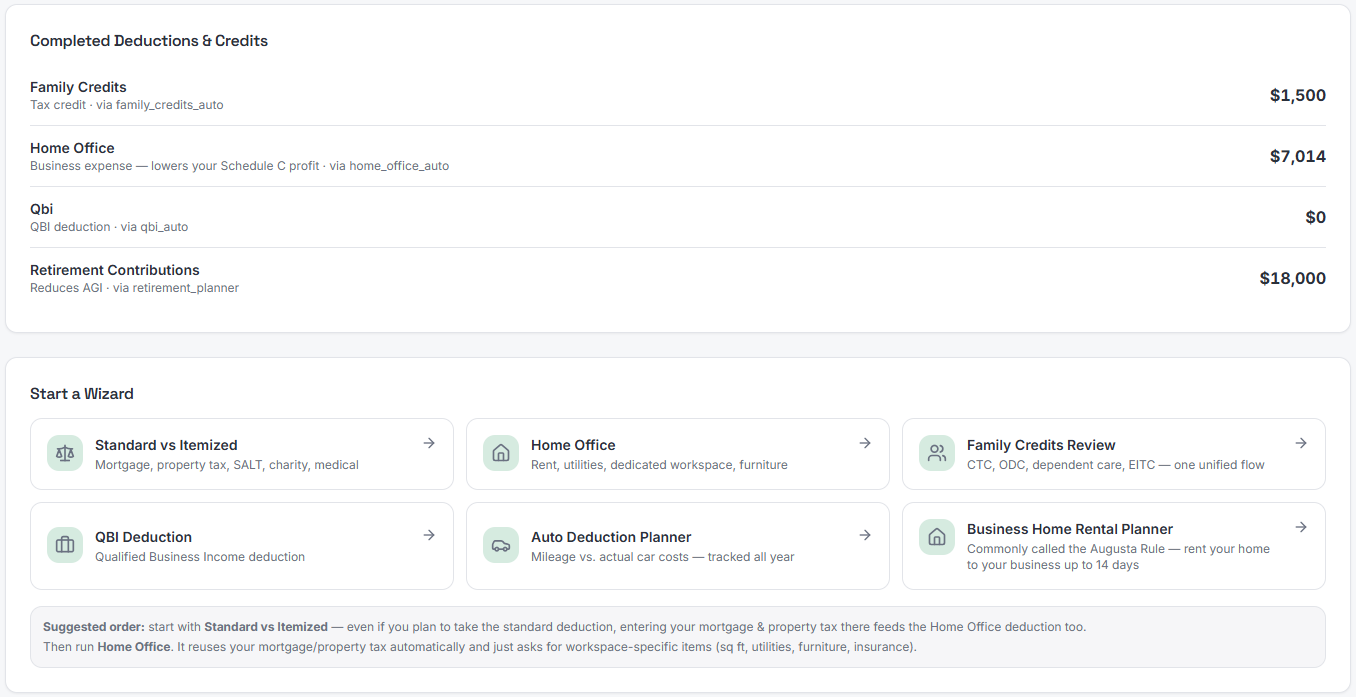
Deduction Optimizer is designed to show an estimated dollar value of applicable deductions before you run each full calculation. Then it walks you through each one, lets you confirm the scenario, and feeds it into your projected annual tax estimate.
The intended difference from a basic deduction checklist is the before-and-after visibility. Instead of guessing whether a home office deduction is worth calculating, you'd see a projected estimate upfront, run the guided comparison, confirm the scenario, and see how it may affect your projected annual tax and remaining estimated-tax payments.
The Deduction Optimizer currently in beta is designed to cover:
QBI (§199A) - designed to screen for eligibility, apply SSTB rules, and model the deduction scenario from your inputs. The Section 199A deduction is generally claimed as a deduction below AGI, not as a direct reduction of Schedule C profit, and does not reduce the self-employment tax base. Actual deductible amount depends on taxable income, filing status, business type, and the full return. Source: IRS Publication 535
Home Office - designed to compare simplified ($5/sq ft, capped at $1,500) vs actual (business-use percentage of all home expenses) and show which scenario produces a larger estimated deduction for your inputs. Source: IRS Publication 587
Auto Deduction - designed to compare standard mileage rate vs actual vehicle expenses (insurance, fuel, maintenance, depreciation). First-year method, business-use percentage, leasing, vehicle classification, and other rules affect which method applies and the deductible amount.
Itemized vs standard - designed to model mortgage interest, SALT, charitable contributions, and medical expenses against your standard deduction threshold and show which direction may produce a larger deduction for your situation. Verify the current SALT cap against IRS guidance at the time of filing.
Section 280A home-rental planning - designed to help users organize facts for a potential home-rental arrangement. A valid deduction may require a bona fide business purpose, fair-market rent, proper records, appropriate entity structure, and professional review. Not available to every freelancer or sole proprietor. Source: IRS Publication 527
Retirement and insurance - designed to model SEP-IRA, Solo 401(k), and self-employed health insurance deduction scenarios. For sole proprietors, SEP-IRA contributions are subject to a special self-employed calculation; the practical limit is generally about 20% of adjusted net self-employment earnings, subject to the annual IRS cap. SEP-IRA contributions generally do not reduce self-employment tax. Source: IRS Publication 560
Family credits - designed to screen for Child and Dependent Care Credit, Child Tax Credit, Other Dependent Credit, and EITC eligibility using household income, filing status, dependent information, and other user inputs
As scenarios are confirmed, each one feeds into the Tax Center projection automatically - so the projected estimate stays current as decisions change, without manually re-entering numbers in a spreadsheet.
How much can advanced tax planning actually save you?
The savings from advanced tax planning vary significantly by situation. These planning areas can involve substantial deductions for taxpayers who qualify, but individual outcomes depend on the full return, filing status, income type, and applicable rules.
Illustrative example only: A taxpayer with $65,000 of qualified business income may have a potential Section 199A deduction of up to $13,000. If that deduction falls within a 22% marginal federal bracket, it could reduce federal income tax by up to about $2,860. Eligibility and actual savings depend on the taxpayer's full return.
These planning areas do not stack as simple independent savings. QBI, retirement contributions, home office, and other deductions interact and may be mutually constrained. Some document an existing deduction rather than create new savings. Planning scenarios are most useful as estimates to inform decisions, not as outcome predictions.
Planning area | Notes on savings potential |
|---|---|
QBI (§199A) | Up to 20% of qualified business income for eligible filers; amount depends on taxable income, business type, SSTB rules, and full return |
Home office (actual vs simplified) | Depends on actual home expenses and business-use percentage; actual method is not always larger |
SEP-IRA contribution | Reduces federal income tax for eligible contributions; generally does not reduce self-employment tax; limit is subject to special self-employed calculation |
Section 280A home-rental | Requires bona fide business purpose, fair-market rent, proper records, and appropriate entity structure; not available to every sole proprietor |
Vehicle: mileage vs actual | Depends on vehicle type, first-year method, business-use percentage, and annual mileage |
Family credits (CDCC/ODC/EITC) | Direct tax credit for eligible filers; eligibility depends on income, filing status, and dependents |
All figures are illustrative estimates only. Actual tax savings depend on each taxpayer's full return, income, filing status, and qualifying circumstances. SnapTax provides tax planning scenarios and estimates, not tax advice. Consult a tax professional for guidance specific to your situation.
What's live now vs. what's planned
Available now in Builder | Optimizer (in Beta) |
|---|---|
Expense tracking and AI expense categorization | In Beta: QBI (§199A) scenario modeling |
Mileage tracking | In Beta: Home office method comparison |
Receipt management | In Beta: Retirement contribution scenarios (SEP-IRA, Solo 401(k)) |
P&L reports | In Beta: Capital gains scenario tracking |
Projected quarterly estimated-tax estimate | In Beta: Itemized vs standard deduction comparison |
"Is This Deductible?" wizard | In Beta: Section 280A home-rental planning |
Asset depreciation tracking | In Planning: Advanced household / spouse/multi-business rollup |
30-day free trial, no credit card required | Beta is Available now at $39.99/month |
Try SnapTax Optimizer
Many SnapTax Optimizer features are built and ready for beta freelancers, 1099 contractors, and self-employed professionals who want to model tax decisions themselves throughout the year - without waiting until April. Designed with scenario tools for QBI, capital gains, retirement contributions, home office method comparisons, and Section 280A home-rental arrangements, all intended to connect to a single projected annual tax and remaining estimated-payment view. For complex situations, a tax professional's judgment is still the right call - but Optimizer is designed to help you arrive at those conversations with far better numbers and records.
The Optimizer plan is currently available in beta at $39.99/month with general availability planned for December 21, 2026 (subject to change). The Builder plan at $19.99/month includes AI expense categorization, the "Is This Deductible?" wizard, mileage tracking, real-time P&L, and receipt management - a solid foundation while Optimizer rolls out. All plans include a 30-day free trial with no contracts and no long term commitments, cancel anytime.
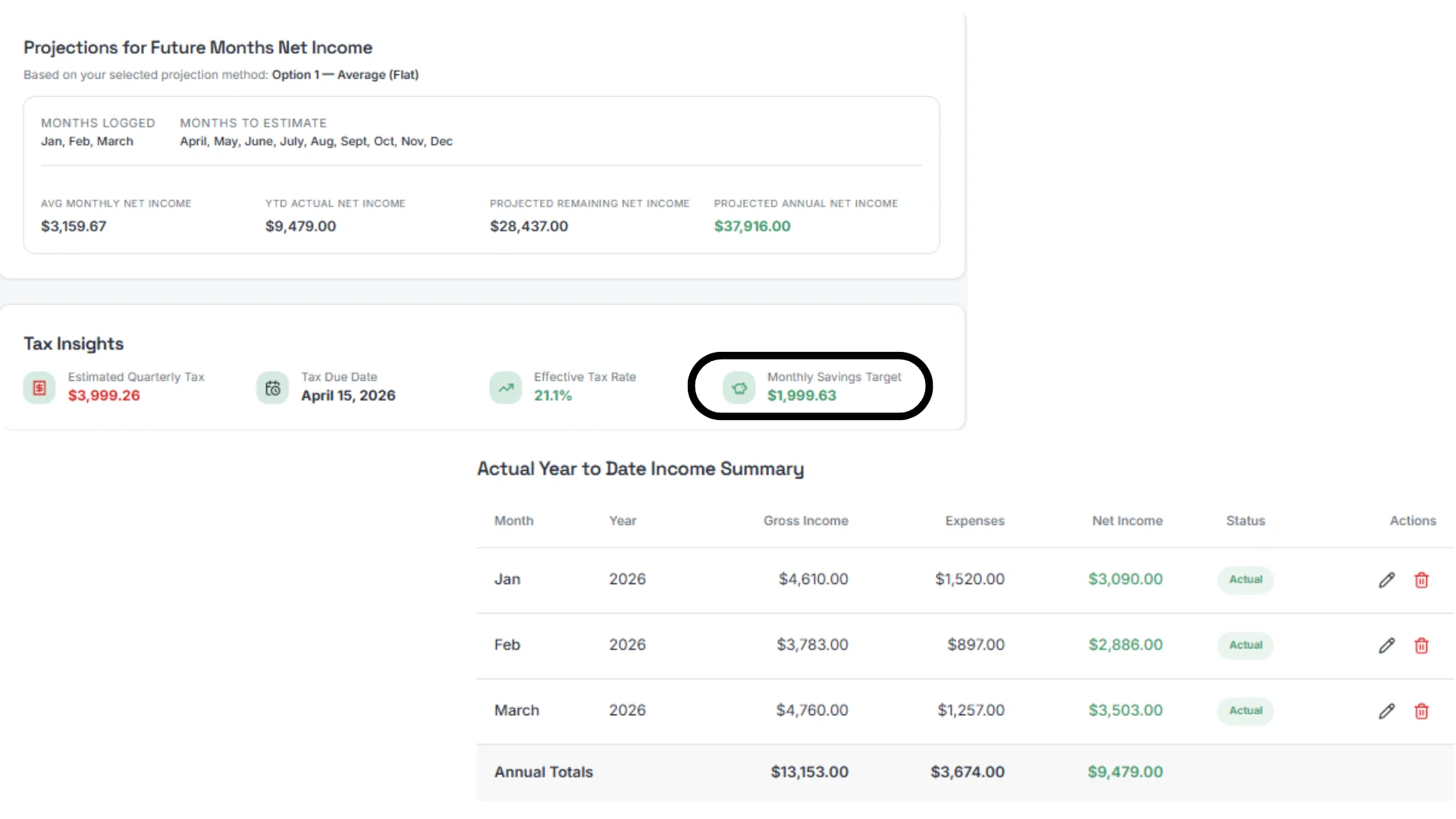
Join the SnapTax Optimizer beta at snaptaxapp.com/pricing. If you have questions about your situation, Crystal Harrison (the founder) offers a 30-minute 1-on-1 session for $49 that includes a projected quarterly estimate calculated from your actual numbers.
Frequently Asked Questions
What does it mean for SnapTax Optimizer to be in Beta?
Beta means most Optimizer features are fully built, tested, and open for real users — it's not a waitlist or a demo. You can sign up today, use available features, and start finding deductions immediately.
The beta designation means we're onboarding users in a controlled way rather than opening the floodgates all at once. This gives us the ability to work closely with early users, gather feedback on real-world tax situations, and make sure everything is running exactly the way it should before we move to general release.
What beta means for you specifically:
You get full access — most Optimizer features are live, including the Deduction Optimizer wizards, Capital Gains Tracker, and Retirement Tax Planner. Still under development are the multi-business capabilities, phase 2 of the real estate capital gains tracker and the AI Platform - due to be release very soon.
You lock your price — beta subscribers lock their rate permanently at early adopter pricing, before general release pricing is set
You get closer support — beta users get direct access to Crystal Harrison (SnapTax founder) for setup questions. The free 30-minute onboarding session, normally $49, is included for beta members
Your feedback shapes the product — if something doesn't work the way you expect, we want to hear about it. Beta users have a direct line to the team
What beta does not mean: unfinished software, half released features, or anything that puts your data or your tax estimates at risk. The core tax engine is the same one that powers every SnapTax plan. Optimizer adds advanced planning features on top of that same foundation.
If you've been thinking about joining, now is the right time. The early adopter price locks permanently the moment you subscribe — it doesn't increase when beta ends.
What is SnapTax Optimizer?
SnapTax Optimizer is the advanced tier of SnapTax - tax planning software built specifically for freelancers, 1099 contractors, and self-employed professionals. It is designed to add advanced deduction modeling on top of the Builder plan: a QBI (Section 199A) deduction scenario tool, home office method comparison, capital gains scenario tracking, retirement and insurance deduction modeling, and full spouse business tracking or multiple businesses - all intended to connect to the same projected quarterly tax estimate. Most Optimizer features are currently available for beta usage. Give it a try, and give us feedback that will help shape the direction of the product.
How much does SnapTax Optimizer cost?
SnapTax Optimizer is priced at $39.99/month and is currently available as beta usage. All SnapTax plans include a 30-day free trial - no contracts, no commitments, cancel anytime. The Starter plan starts at $4.99/month and the Builder plan at $19.99/month for freelancers who don't yet need the advanced deduction modules.
What deductions does SnapTax Optimizer plan to cover?
The planned SnapTax Optimizer is designed to help freelancers organize and model deductions that often require separate calculations: the QBI deduction (Section 199A), home office method comparison (simplified vs actual), retirement and insurance deductions (SEP-IRA, Solo 401(k), self-employed health insurance), capital gains from brokerage accounts, itemized deductions including mortgage interest and SALT, and Section 280A home-rental scenarios. Eligibility and deductible amounts depend on each taxpayer's full return. Optimizer is currently available via waitlist.
How is SnapTax Optimizer different from TurboTax Self-Employed?
TurboTax Self-Employed is primarily designed for preparing an annual return - it compiles your deductions after the year ends and submits your return. SnapTax Optimizer is designed to model scenarios throughout the year and show how they may affect projected annual tax and projected remaining estimated-tax payments. Some freelancers may use a planning tool during the year and filing software or a CPA at tax time - the two serve different parts of the tax calendar.
Is SnapTax Optimizer available now?
SnapTax Optimizer is currently in beta and can be purchased at snaptaxapp.com/pricing. The Starter and Builder plans are fully live and include a 30-day free trial. The Builder plan ($19.99/month) includes AI expense categorization, the 'Is This Deductible?' wizard, mileage tracking, P&L reports, and real-time quarterly tax estimates - a strong starting point while Optimizer finishes rolling out.
