Best Quarterly Tax Estimate Software for Freelancers in 2026: A Real Comparison
Crystal Harrison · October 22, 2026 · 15 min read
Best Quarterly Tax Estimate Software for Freelancers in 2026: A Real Comparison
Compare SnapTax, Hurdlr, Keeper, and TurboTax on tax estimates, payment tracking, filing support, workflow, and cost.
October 22, 2026 · 10 min read
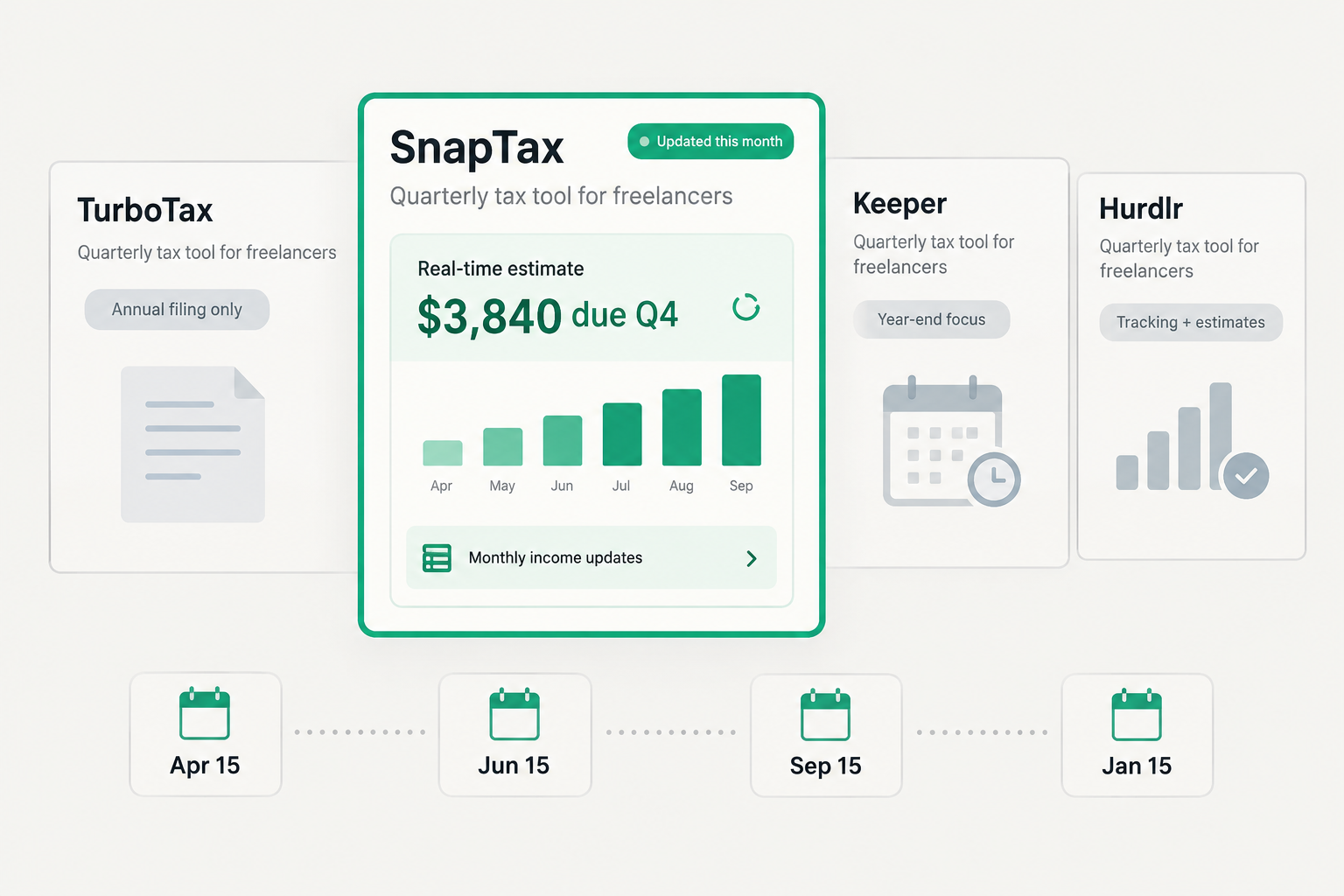
Disclosure: This comparison is published by SnapTax. It is based on publicly available product descriptions, pricing, and support documentation reviewed in October 2026. We did not independently test every feature. Features and prices may change.
TL;DR
These tools serve overlapping but different needs. SnapTax offers a category-based bookkeeping and projected-tax workflow with three income-forecasting methods (Flat, Growth, and Seasonal). Hurdlr combines automatic tracking with live tax estimates and payment tracking. Keeper combines bookkeeping and filing, with quarterly-tax support on its Premium plan and a public quarterly calculator. TurboTax primarily serves annual return preparation but also provides estimated-tax calculation resources. Compare the specific plan, supported inputs, and workflow each product offers rather than assuming any one tool handles every situation.
What's the real difference between quarterly estimate tools?
Most quarterly tax estimate tools are not doing the same thing, even when they use the same language.
Tools that say they "handle quarterly taxes" are often doing one of two things: filing your annual return (which happens to include a quarterly payment summary), or giving you a static estimate at the start of the year that you pay in four installments. Some also provide live tax estimates that update as you track income - that is a different capability, and worth distinguishing.
The problem is that freelancer income doesn't arrive in predictable, quarterly chunks. A graphic designer might land a large contract in July that doubles their annual income. A consultant might have a slow Q2 and a packed Q3. A writer might earn $4,000 in January and $18,000 in August. When income swings that much, an estimate set in January can be significantly off by June.
An estimated-tax underpayment penalty may apply when withholding and timely estimated payments do not satisfy the applicable installment requirements. Federal safe-harbor calculations generally use the smaller of 90% of current-year tax or the applicable percentage of prior-year tax.
We compare four tools freelancers may consider for tax tracking, estimates, and filing: SnapTax, Keeper Tax, Hurdlr, and TurboTax.
What makes a quarterly estimate actually good?
A good quarterly estimate does three things.
First, it reflects current-year information and realistic assumptions about the remaining year. A useful tax projection uses what you've actually earned alongside reasonable expectations about future income - not a fixed number from the prior year applied without adjustment.
Second, a separate payment calculation should also consider prior-year safe harbors, withholding, and payments already made. A projection that updates as income changes is a planning tool. Penalty protection depends on satisfying the applicable installment requirements, which may already be met through prior-year-based payments even when current-year income is rising.
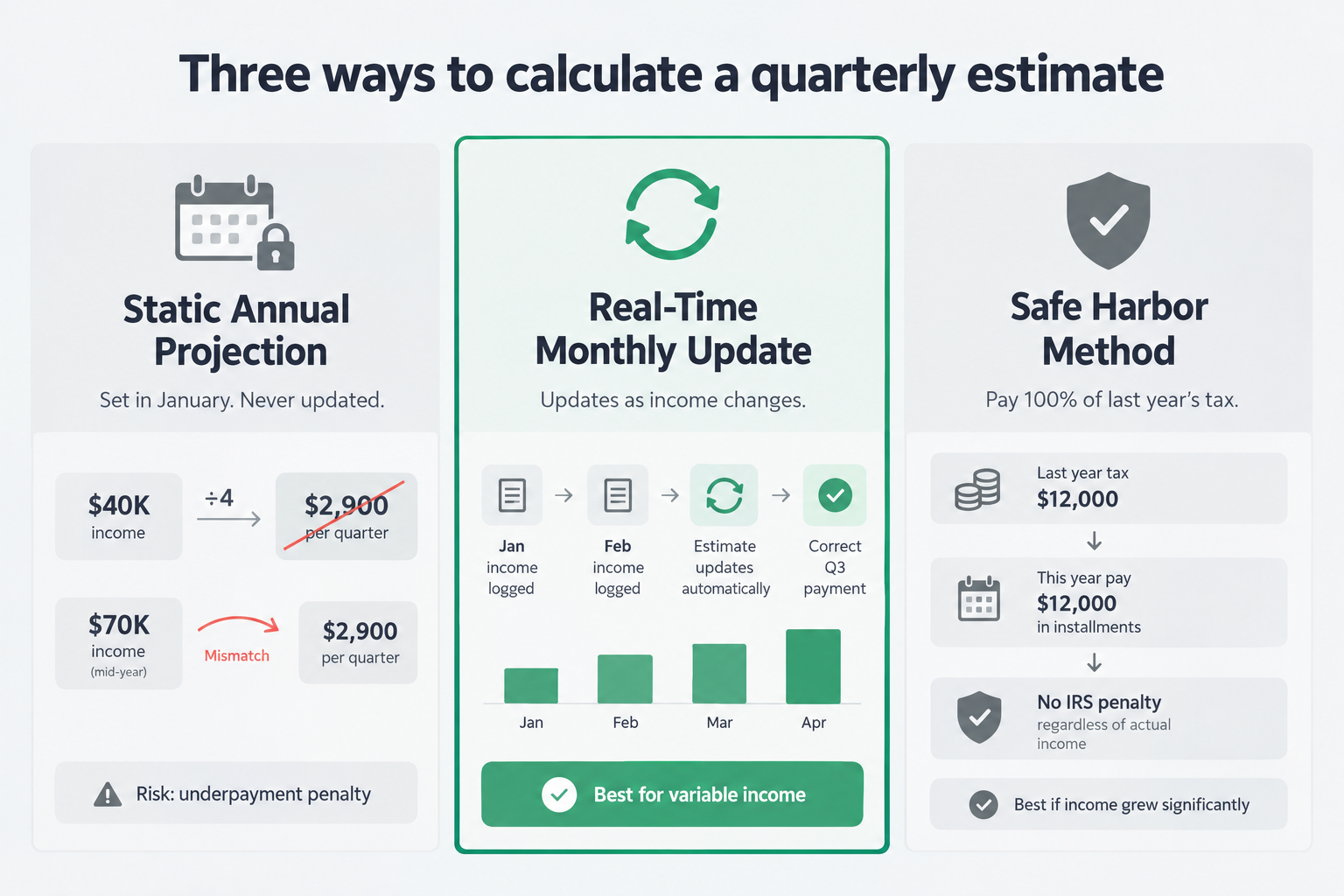
Third, it accounts for the right calculation method. The IRS allows several approaches to determine required estimated payments:
Safe harbor based on prior-year tax - pay 100% of last year's total tax (110% if your prior-year AGI exceeded $150,000, or $75,000 if married filing separately). This can provide penalty protection even if you ultimately owe more at filing.
90% of current-year tax - use a current-year tax projection to plan payments toward the applicable 90%-of-current-year-tax benchmark. The final benchmark depends on actual tax, and timely withholding and installment payments matter.
Annualized installment method - uses income, deductions, and other tax information for specified cumulative periods to calculate required installments. It can account for uneven income, but it involves prescribed IRS calculations and is not the same as a seasonal forecasting model.
These are IRS payment-amount methods. They are separate from how a tool models or forecasts your projected income. SnapTax's Flat, Growth, and Seasonal options are income-forecasting methods - they help model projected annual income under different assumptions. Safe-harbor targets and required installment calculations are separate: they depend on tax liability, prior-year information, withholding, payment history, and applicable rules.
How do the four tools actually compare?
Here's a direct comparison across the features that matter most for quarterly estimates:
SnapTax | Hurdlr | Keeper | TurboTax | |
|---|---|---|---|---|
Income/expense tracking | Manual income logging; AI categorization (Builder plan) | Manual finance tracking; semi-auto mileage (Free); automatic connected accounts (Premium+) | AI-scanned from linked accounts | Manual + 1099 scan + QuickBooks import |
Tax-estimate capability | Updates as you add or revise relevant financial information; three forecasting methods (Flat, Growth, Seasonal) | Live tax estimates (Free and Premium); detailed estimates with payment tracking (Premium) | Quarterly-tax support (Premium plan); free public quarterly calculator | Estimated-tax calculation resources; estimated-payment information during return preparation |
Payment tracking | Yes; direct IRS payment links | Yes (Premium) | Not verified from documentation reviewed | Ongoing payment-tracking scope not verified; confirm the product and edition |
Safe-harbor functionality | Supported when prior-year inputs are provided | Not verified from documentation reviewed | Not verified from documentation reviewed | Estimated-payment support available during return preparation; verify edition-specific scope |
W-2/household inputs | Combined W-2 + 1099 support | W-2 income can inform the tax profile; verify documented limitations | Not verified | Yes |
State-estimate scope | Federal projections and supported state calculations; availability and limitations vary | Not verified | Public calculator advertises federal and state; plan-specific scope requires confirmation | At filing (state return add-on) |
Filing | No; TXF export for supported tax-software workflows | Self-service filing integration on Pro plan (eligible U.S. subscribers; federal plus one state included, subject to current eligibility) | Yes; professional review included | Yes (primary function) |
Free option | Permanent free tier (basic projected annual calculations) | Free plan with real-time tax estimates (manual tracking) | Free public quarterly-tax calculator (not a free subscription plan) | Free to start; pay to file |
Price | Starter $4.99/mo; Builder $19.99/mo or $199/yr | Free; Premium $100/year; Pro $200/year | $199+/year (confirm current plans at keepertax.com) | Per annual filing (confirm current pricing at turbotax.intuit.com) |
The table reflects documented capabilities and should not be read as a definitive feature comparison. Confirm plan-specific details directly with each provider before making a purchase decision.
What happens when your income changes mid-year?
This is the scenario where different tools diverge most sharply.
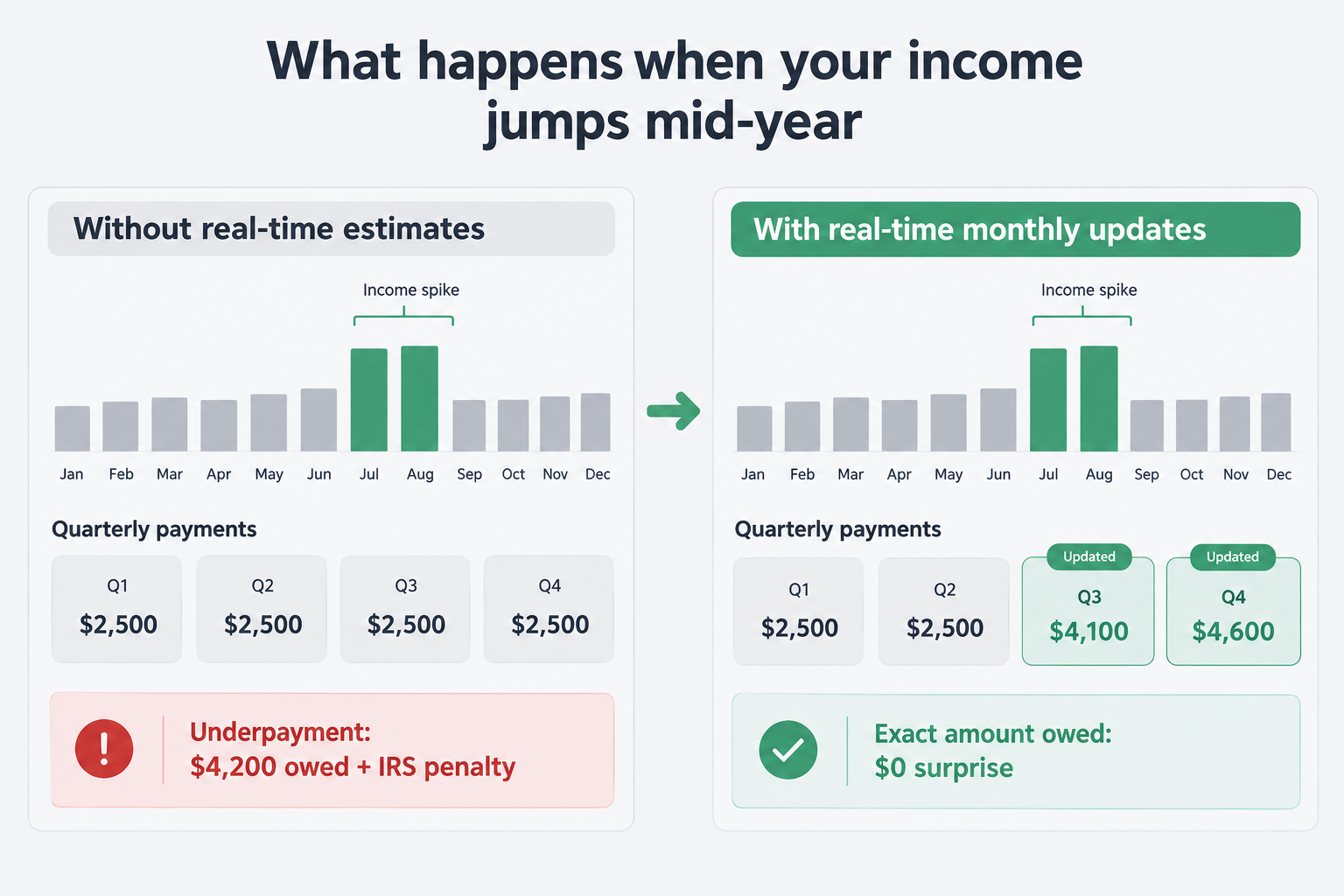
Say you set your Q1 quarterly payment in January based on last year's $45,000 income. You pay $2,800 each quarter. Then in July, you land a project that's going to bring in an extra $30,000 by December. Your projected annual tax liability is now meaningfully higher.
"Because side income can change throughout the year, it's easier to update quarterly payments than to keep changing your withholding amounts." - r/tax
The additional income may increase the final tax bill and the amount worth reserving. Whether required payments must increase depends on your safe-harbor position, withholding, payment history, and any annualized-income calculation. If you're already meeting an eligible prior-year safe harbor through timely payments, you may owe additional tax at filing without an estimated-tax penalty.
The practical step is to recalculate the projected annual tax and check your remaining payment requirements. Increasing payments or reserves may be appropriate, depending on where you stand against the safe-harbor thresholds.
How does SnapTax update your tax projection?
SnapTax updates your tax projection when you add or revise relevant financial information. Users who upload statements monthly can review the updated projection as part of their monthly bookkeeping routine.
Freelance income can fluctuate throughout the year. SnapTax's forecasting tools help you update your projected annual tax as your financial information changes. That projection complements - not replaces - an eligible prior-year safe-harbor calculation, which may provide a stable payment target even when current-year income rises or falls.
Record $6,000 of received business income in September, and SnapTax updates the projection using that income and your selected forecasting assumptions. Change your projection method from Flat to Seasonal, and the estimate recalculates. Add a deduction, same thing.
The three forecasting methods - Flat, Growth, and Seasonal - are different ways of modeling projected annual income:
Flat projects your current pace forward to December. Best when income is consistent.
Growth accounts for an income trajectory - useful if you're adding clients or have a seasonal ramp.
Seasonal matches your historical quarterly pattern. Best if your income has a predictable high/low rhythm.
These are income-forecasting methods. When you provide prior-year tax and income information, SnapTax can also apply safe-harbor targets to flag whether current payments may meet the applicable penalty-protection requirements.
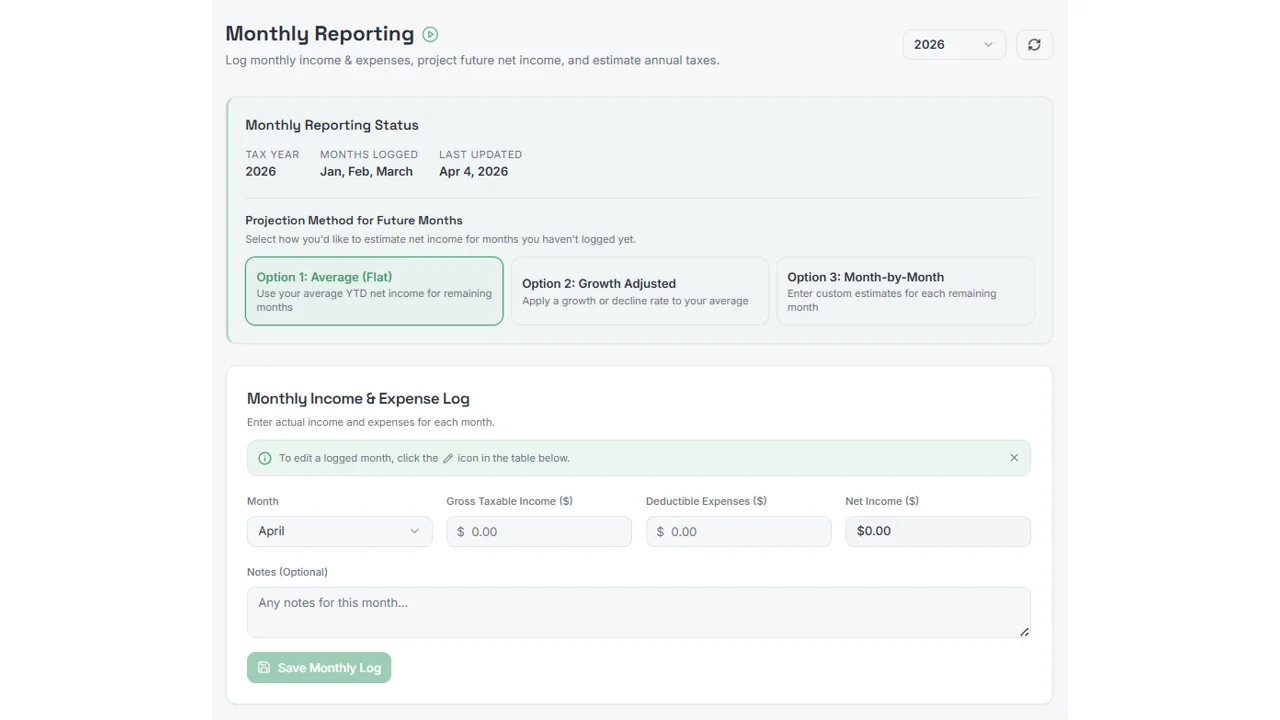
as taken from SnapTax
The Starter plan covers the dashboard, the three forecasting methods, quarterly payment tracking with direct IRS payment links, and W-2 + 1099 combined income support. It's $4.99/month after a 30-day trial (a credit card is required to start the trial, with no long-term commitment - cancel anytime). A permanent free tier is also available for basic projected annual tax calculations.
The Builder plan at $19.99/month adds AI-powered expense categorization, bank statement upload, GPS mileage tracking, P&L reports, and the "Is This Deductible?" wizard - which provides preliminary guidance based on the facts entered and relevant tax rules.
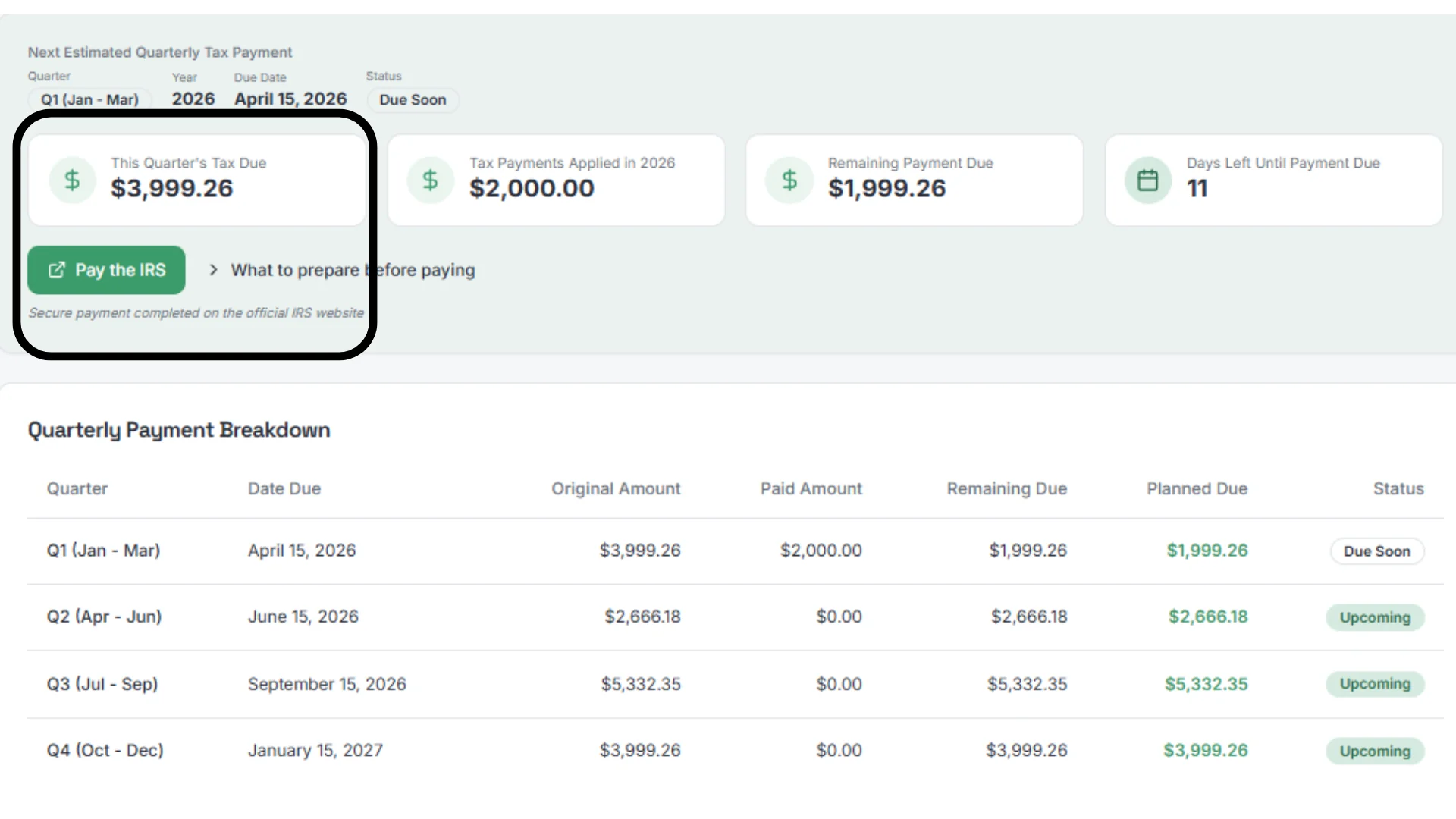
as taken from SnapTax
Our take: If quarterly estimated taxes are your primary concern - especially with variable income - SnapTax is worth evaluating. It's not a filing tool, which means you'll still use a TXF export for supported tax-software workflows or work with a CPA at year end. For active tax planning throughout the year, SnapTax offers three named income-forecasting options - Flat, Growth, and Seasonal - within its guided bookkeeping workflow.
Hurdlr: automatic tracking and live tax estimates
Hurdlr is worth evaluating alongside SnapTax for quarterly estimate management. Its free plan includes semi-auto mileage, manual finance tracking, real-time tax estimates, and data exports. Premium adds automatic connected-account tracking, detailed tax estimates, and payment tracking. Pro adds accounting tools, invoicing, and a self-service filing integration.
Automatic mileage tracking is a prominent Hurdlr feature. If you drive to clients, make deliveries, or work as a rideshare driver, its automatic GPS mileage tracker receives strong user reviews. App Store reviews describe it as well-suited to 1099 contractors who prioritize mileage deductions.
Hurdlr provides live tax estimates informed by the financial information and tax-profile inputs it supports. Premium adds detailed tax estimates and payment tracking. Compare those inputs and calculation assumptions with SnapTax's three named forecasting options to determine which better fits your situation. SnapTax offers explicit Flat, Growth, and Seasonal income-forecasting methods alongside a payment-requirement check against prior-year thresholds; how Hurdlr's projection approach compares on those specific dimensions should be verified directly.
Safe-harbor calculation support was not verified from the documentation reviewed.
Pricing:
Plan | Cost | What's included |
|---|---|---|
Free | $0 | Semi-auto mileage, manual finance tracking, real-time tax estimates, exports |
Premium | $100/year billed annually, or $9.99/month | Automatic tracking, detailed tax estimates, payment tracking |
Pro | $200/year | All Premium + accounting, invoicing, self-service filing integration |
Our take: Hurdlr Premium is worth evaluating if you prefer automatic mileage and connected-account tracking alongside tax estimates and payment tracking. Pro adds accounting tools and a filing integration. Compare its supported tax-profile inputs and projections with SnapTax's documented workflow to decide which fits your situation.
Keeper: bookkeeping and filing, with plan-specific quarterly-tax support
Keeper combines bookkeeping and filing services. It scans your linked bank and credit accounts daily, flags potential business deductions using AI, and files your taxes with a real tax professional reviewing the return before submission.
Keeper's Premium plan advertises quarterly-tax support, and Keeper also provides a free public quarterly-tax calculator. Confirm whether the plan's quarterly workflow is self-service, accountant-assisted, or automatically updated from your records before choosing it. That distinction matters if you need projections to update continuously as income changes.
The app's core strengths are year-round deduction tracking and professional filing. It's a meaningful service for freelancers whose primary concern is identifying deductions and getting a reviewed annual return.
Pricing: Confirm current plan names and prices directly at keepertax.com/pricing, as plan structures and pricing change. A free public quarterly-tax calculator is available without a paid subscription.
Our take: Keeper is a legitimate choice for expense tracking and professional filing. If you already have quarterly estimates handled - via SnapTax or manual calculation - Keeper as a filing companion is a reasonable stack. Confirm the quarterly-tax support details for the specific plan you're evaluating.
TurboTax: annual filing standard, with estimated-tax calculation resources
TurboTax is primarily an annual return preparation tool. It handles Schedule C, snaps and imports 1099-NEC forms via phone camera, integrates with QuickBooks, and covers crypto and investment income.
TurboTax also provides estimated-tax calculation resources and can generate estimated-payment information during return preparation. Review the assumptions and update expected income, deductions, withholding, and other relevant inputs where supported. Confirm the features of the specific TurboTax product you are considering, as this differs from a year-round bookkeeping workflow that updates projections continuously as your financial records change. Freelancers who want active quarterly estimate management throughout the year typically use a separate tool. SnapTax exports a TXF file for supported tax-software workflows, which may include TurboTax - verify the export format and current compatibility before relying on that workflow.
Pricing: Confirm current pricing at turbotax.intuit.com, as rates and plan names change by filing year. TurboTax charges per filing; there is no annual subscription.
Our take: TurboTax is a strong choice for annual filing and provides estimated-tax calculation resources. For active quarterly estimate management throughout the year - where projections update as income is logged - it is not designed to do that work. Pairing it with a dedicated planning tool during the year is a reasonable approach for freelancers who want both capabilities.
Which tool fits your situation?
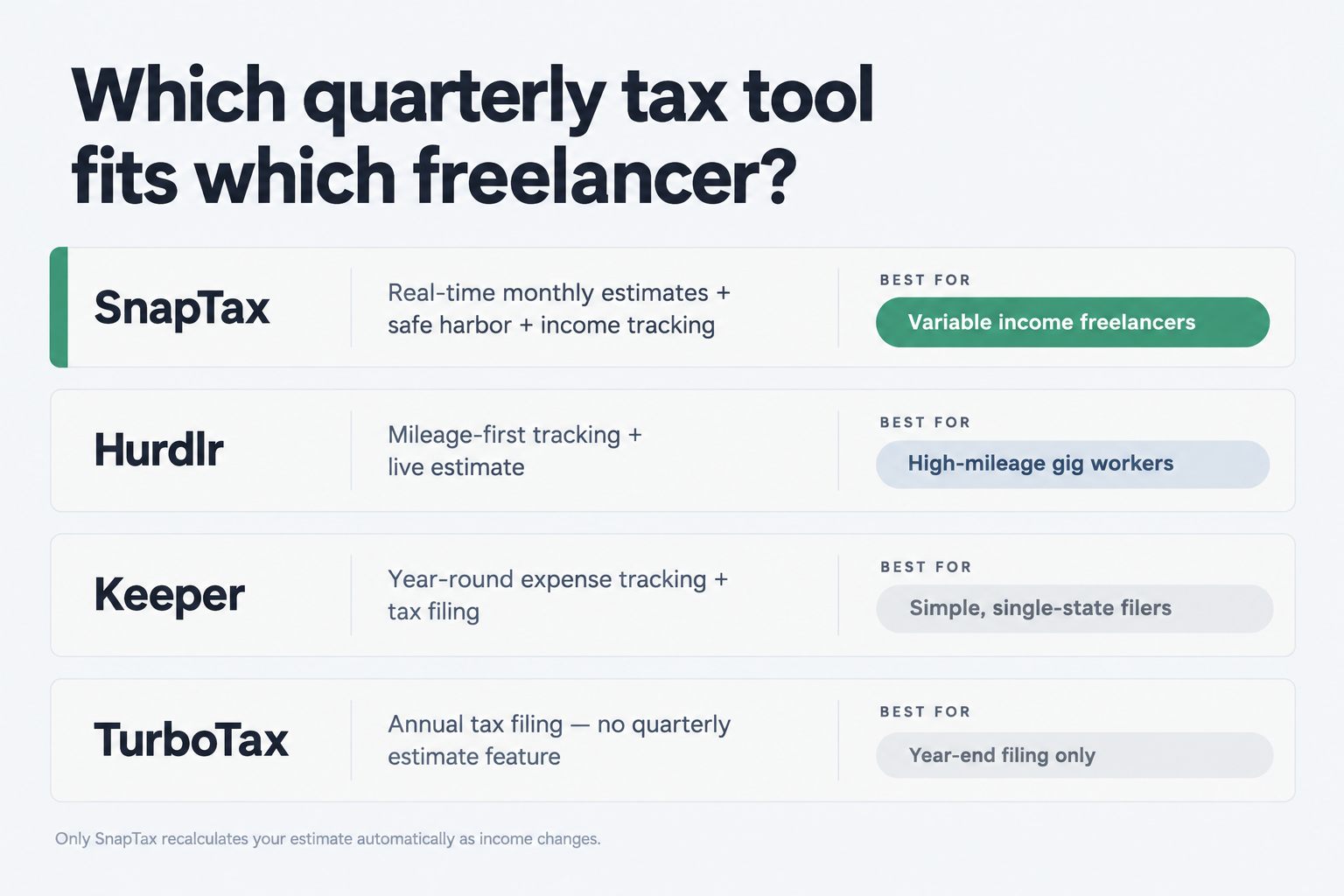
The choice comes down to what your actual workflow needs:
Your income varies month to month and you want your quarterly estimate to reflect that. SnapTax is worth evaluating. Its three income-forecasting methods and ongoing recalculation as income is logged are designed for this use case.
You drive a lot and mileage is your biggest deduction. Hurdlr Premium is worth a look. The live estimate is a genuine feature; the mileage tracking is the core.
You want one tool to track expenses and file, and you're comfortable handling quarterly estimates separately. Keeper covers the annual workflow well. Confirm the quarterly-tax support details for the plan you're considering.
You need to file your annual return accurately. TurboTax is a comprehensive filing tool. Pair it with SnapTax for quarterly management during the year.
You could use SnapTax for ongoing planning throughout the year and compatible tax software for annual filing. Confirm the export format and supported destination before relying on that workflow.
Try SnapTax
SnapTax was built for the quarterly estimate workflow that annual filing tools aren't designed to support. If your income varies - even seasonally - and you want a tool that models different income scenarios and checks your payments against prior-year thresholds, it's worth evaluating against the alternatives in this comparison.
A permanent free tier is available for basic projected annual tax calculations. The Starter plan at $4.99/month (30-day trial, credit card required, no long-term commitment) covers updated estimates using your selected forecasting method, all three forecasting methods, direct IRS payment links, and safe-harbor threshold checks when prior-year information is provided. The Builder plan at $19.99/month adds AI expense categorization, GPS mileage tracking, and the "Is This Deductible?" wizard.
You can also book a 30-minute setup session with Crystal Harrison, SnapTax's founder, for $49. She'll calculate your quarterly estimate from your actual numbers and walk you through the setup. The session helps you configure the tool using your financial information.
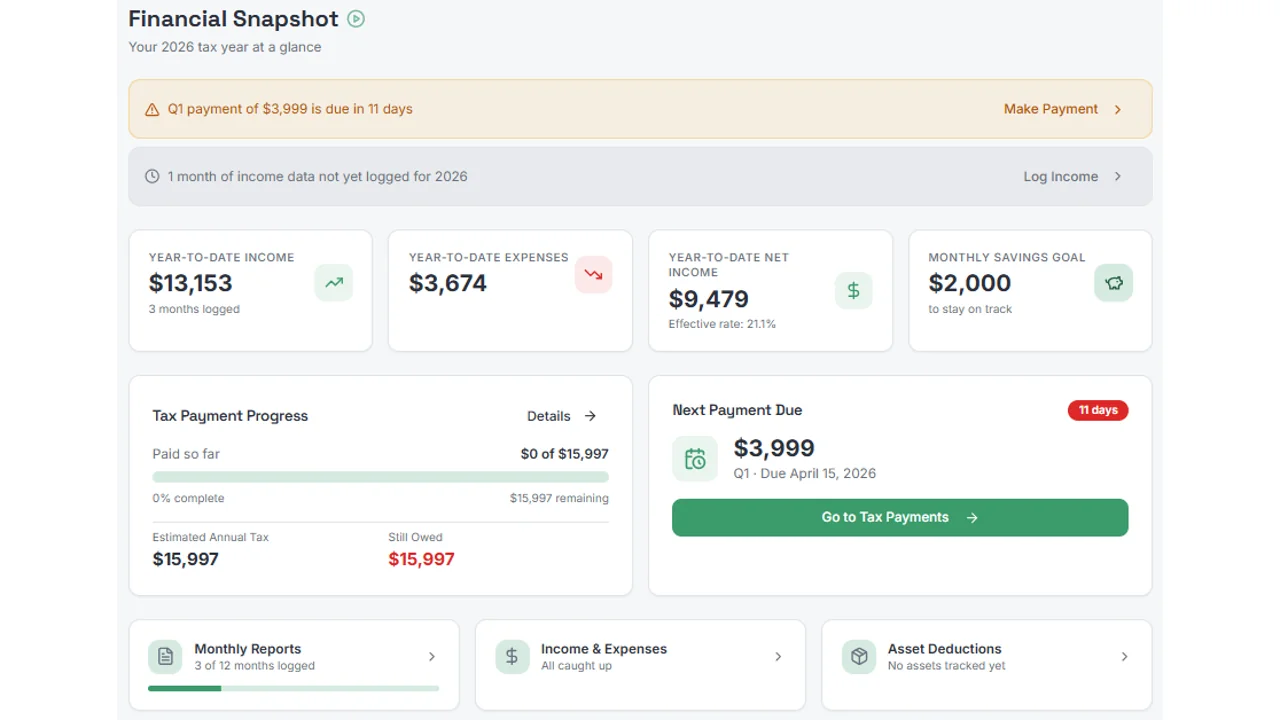
as taken from SnapTax
Research for this article was conducted in October 2026. Tool capabilities, pricing, and plan names change - verify current details directly with each provider before purchasing.
Frequently Asked Questions
What is the best quarterly tax estimate software for freelancers in 2026?
SnapTax is a strong option for freelancers with variable income. It updates your projected tax estimate monthly as income is logged, offers three income-forecasting methods (Flat, Growth, and Seasonal), and tracks federal, state, and self-employment tax. Plans start at $4.99/month with a 30-day trial (credit card required); a free tier is available for basic projected annual tax calculations. Hurdlr is worth comparing if automatic mileage tracking is a priority alongside live tax estimates.
Does TurboTax calculate quarterly estimated taxes for freelancers?
TurboTax is primarily an annual return preparation tool. It also provides estimated-tax calculation resources and can generate estimated-payment information during return preparation. Review the assumptions and update expected income, deductions, withholding, and other relevant inputs where supported. This differs from a year-round bookkeeping workflow that updates quarterly projections continuously as your financial records change. Freelancers who need active quarterly estimate management during the year typically use a separate tool alongside TurboTax.
What is the safe harbor rule for quarterly taxes?
Federal estimated-tax safe harbors generally compare withholding and timely estimated payments with installment requirements based on the smaller of 90% of current-year tax or 100% of prior-year tax. The prior-year percentage generally increases to 110% when prior-year AGI exceeds $150,000 - or $75,000 if the current filing status is married filing separately. The prior-year return must cover 12 months. A projection helps with planning but does not itself establish penalty protection. State rules differ. Consult a tax professional for your specific situation.
Is Keeper Tax good for quarterly estimated taxes?
Keeper offers quarterly-tax support on its Premium plan and provides a free public quarterly-tax calculator. Its core strengths are year-round expense tracking and professional filing at year end. The quarterly workflow's level of automation - self-service, accountant-assisted, or automatically updated from linked records - is worth confirming directly with Keeper before choosing it for active quarterly estimate management throughout the year.
How much does quarterly tax estimate software cost for freelancers?
Pricing varies across tools and plans: SnapTax has a permanent free tier for basic projected annual tax calculations, with paid plans at $4.99/month (Starter) and $19.99/month (Builder); Hurdlr has a free plan with real-time tax estimates and Premium at $100/year with automatic tracking; Keeper starts at $199/year depending on plan; and TurboTax charges per annual filing. Confirm current pricing directly on each product's site, as rates change.
