Independent Contractor Accounting Software: What You Actually Need vs. What Most Tools Sell You
Crystal Harrison · October 7, 2026 · 14 min read
Independent contractor accounting software: what you actually need vs. what most tools sell you
Most accounting software was built for businesses with employees, not solo 1099 workers. Here's exactly what independent contractors actually need - and what to ignore.
October 7, 2026 · 10 min read
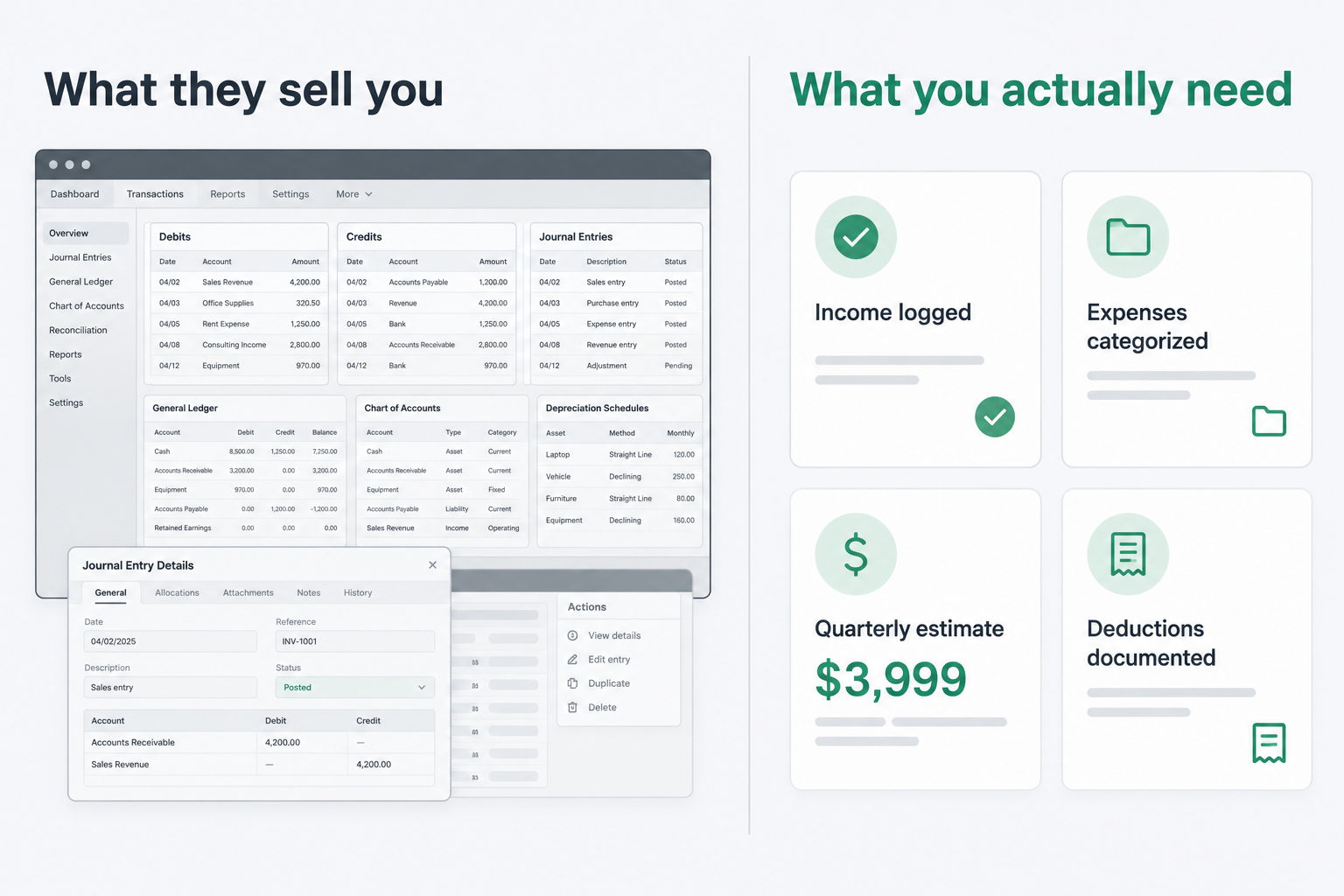
TL;DR
Most independent contractor accounting software is built for small businesses, not 1099 workers. A solo contractor doesn't need double-entry bookkeeping or payroll. They need income tracking, expense categorization, quarterly tax estimates, and deduction documentation. If your tool does all four of those well, it's the right tool. Most tools don't. SnapTax was built specifically for this gap - it handles quarterly estimates, AI expense categorization, and deduction documentation without the complexity of a full accounting system.
What does "accounting software" actually mean for a 1099 worker?
The term "accounting software" means something very different depending on who's asking. For a business with employees, it means a full general ledger: payroll, accounts payable, accounts receivable, depreciation schedules, and sometimes inventory. For an independent contractor or 1099 freelancer, it means something much simpler.
You need to know how much money came in. You need to know how much you spent on business expenses. You need to calculate what you owe the IRS every quarter. And you need to document your deductions so you can defend them if anyone asks.
That's four jobs. Most accounting platforms are built to do 40.
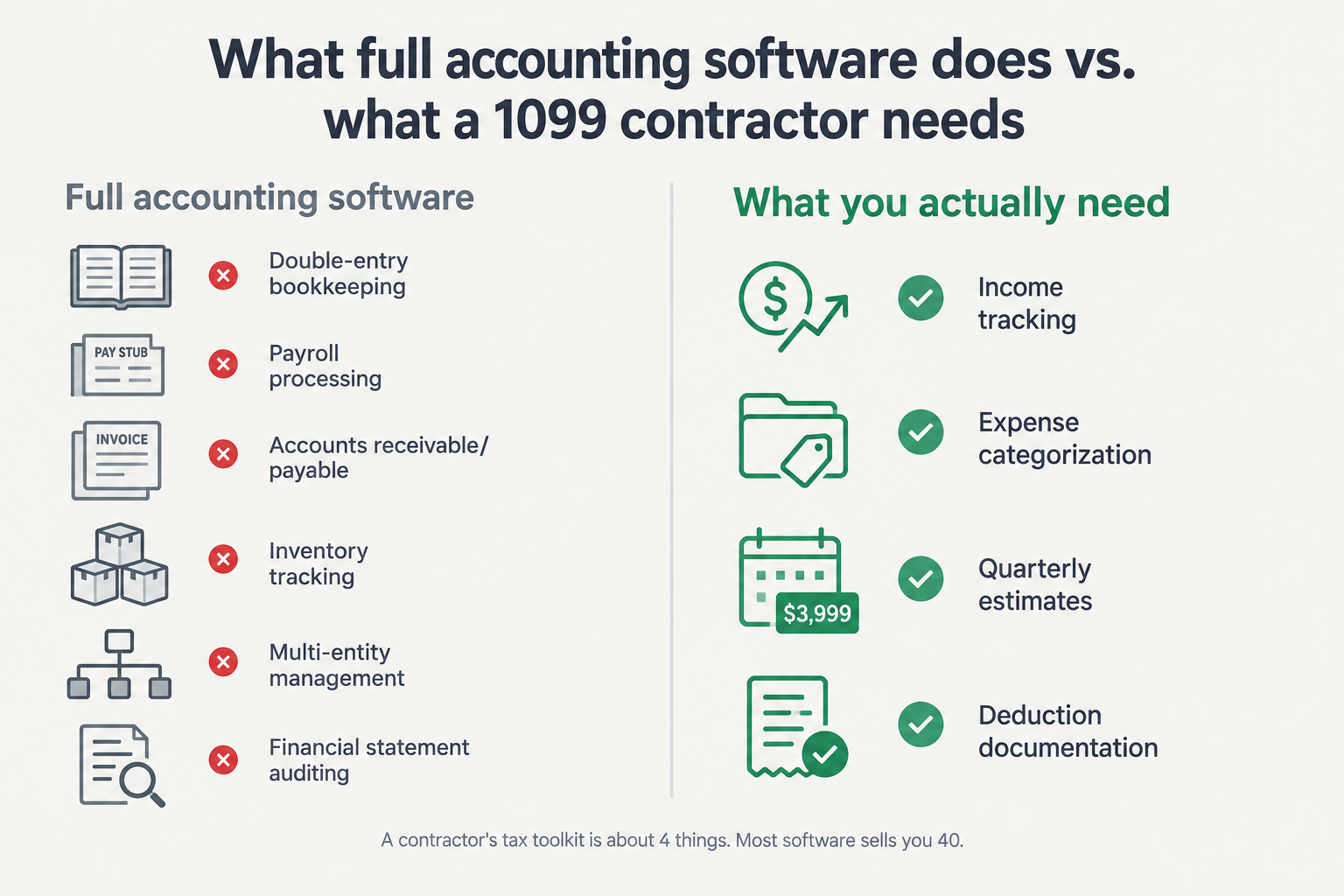
Here's the core mismatch: accounting software was designed for businesses that need to track what they owe vendors, what vendors owe them, and how to account for all of it in a way that satisfies a CPA and sometimes the SEC. Independent contractors don't have any of that. You have clients who pay you. You have expenses you pay. The IRS wants self-employment tax on your net earnings plus income tax, paid in four installments across the year. That's your entire financial picture.
The software industry has not fully caught up to this. You'll find plenty of tools with "self-employed" or "freelancer" in their marketing, but open them up and you'll find invoice templates, time trackers, and chart-of-accounts setup wizards. Useful for some things. Largely beside the point for quarterly tax planning.
Why does variable income make this harder than it looks?
Variable income is the thing that makes 1099 tax planning genuinely hard. When you earn a salary, your employer withholds taxes from every paycheck. Your tax situation is more or less set. When you're an independent contractor, nothing is withheld. You're responsible for estimating what you'll owe and paying it in advance, four times a year.
The problem is that your income isn't predictable. A freelance designer might earn $3,000 in January, $8,000 in March, $1,200 in June, and $11,000 in September. A consultant might land a big contract mid-year that doubles their projected annual income. The IRS still expects you to pay quarterly - and underpaying can result in an IRS underpayment penalty.
"Because side income can change throughout the year, it's easier to update quarterly payments than to keep changing your withholding amounts." - r/tax
Most accounting tools handle this by asking you to set a quarterly estimate once and stick with it. That works fine for consistent income. It breaks down the moment your income changes - which for most independent contractors is constantly.
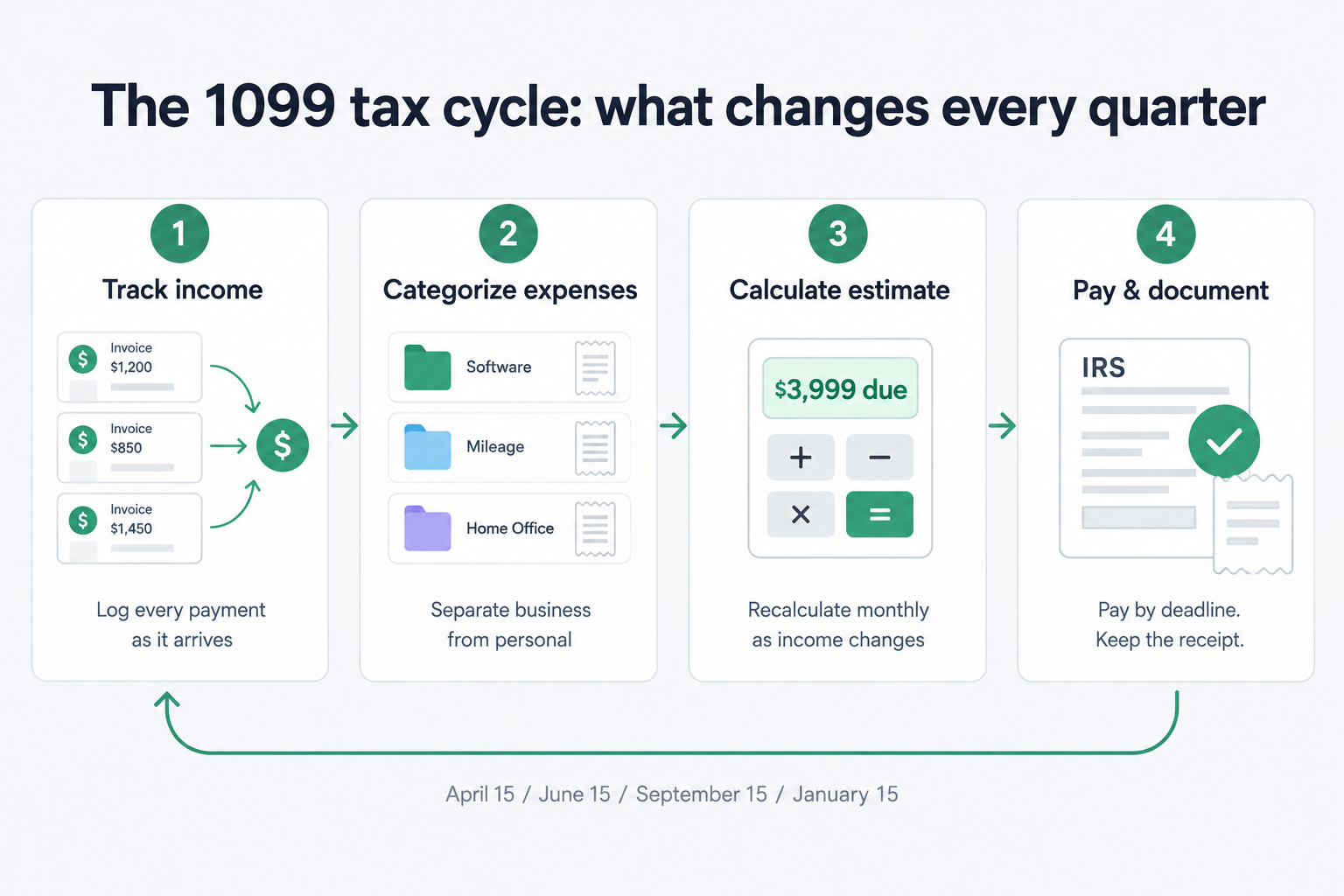
The four quarterly payment deadlines are April 15, June 15, September 15, and January 15. Missing a deadline or underpaying can result in an IRS underpayment penalty, calculated on the shortfall amount. It typically appears on your return without a separate notice. Meeting the safe harbor threshold (see the evaluation checklist below) protects you from this penalty even if you end up owing more at filing.
"HELP! Got penalty for not paying estimated tax???" - r/tax, 2024
The community threads about this penalty are consistent: most people didn't know it existed until they owed it. The right independent contractor accounting software helps you stay within safe harbor by keeping your estimate current.
What does a 1099 contractor actually need from accounting software?
For many solo contractors, the list comes down to four things. Here's what each one means in practice.
1. Does it track income from multiple sources?
Most independent contractors have income coming from multiple clients. Some have a mix of W-2 employment and 1099 work. Your accounting tool needs to handle all of it in one place.
The specific mechanics matter here. For quarterly estimates, what the IRS cares about is your net self-employment income - income minus legitimate business expenses. Software that tracks gross income without tying it to expenses can't give you an accurate tax estimate.
SnapTax's Financial Snapshot dashboard shows year-to-date income, year-to-date business expenses, net income, and your projected quarterly payment all on one screen.
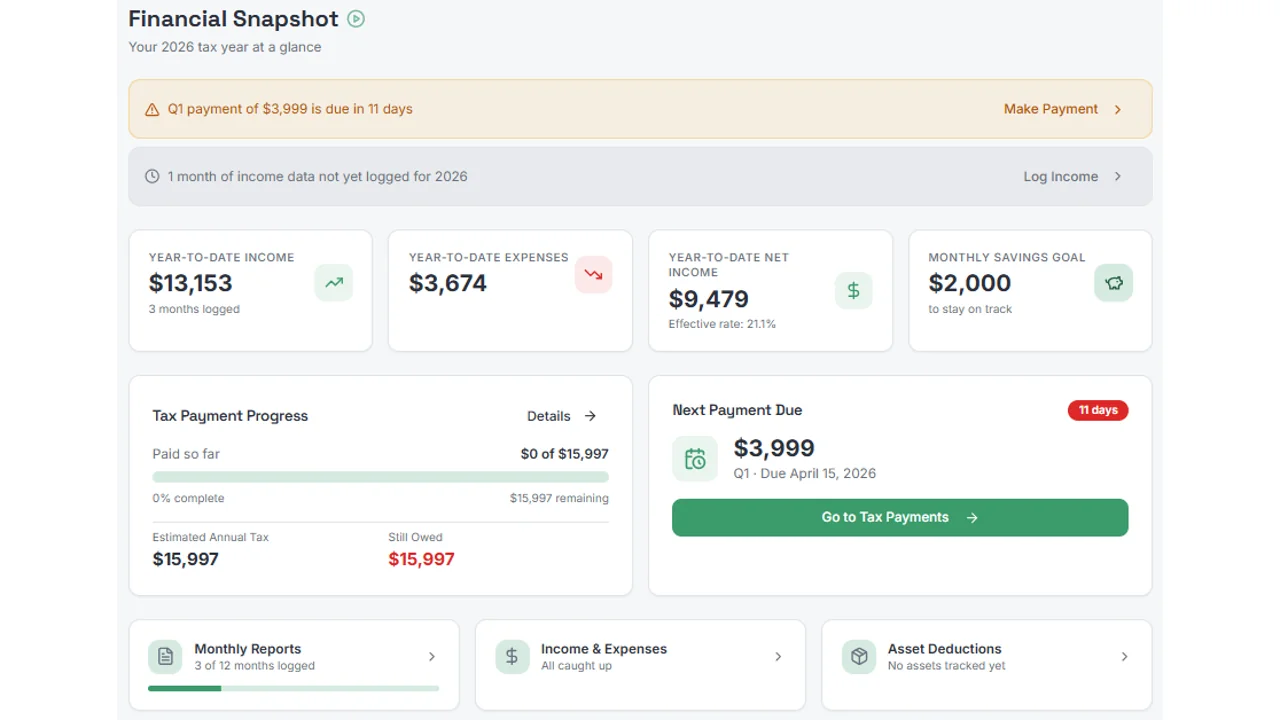
The dashboard in that screenshot is showing $13,153 in year-to-date income, $3,674 in expenses, and $9,479 in net income - with the quarterly estimate and payment deadline front and center. That's the read you need every month, not a general ledger.
2. Does it categorize business expenses accurately?
Expense categorization is where most independent contractors lose money. The IRS allows deductions for ordinary and necessary business expenses - but only if you can document them correctly. Miscategorizing or missing expenses isn't just an accounting error; it's money you're overpaying in taxes.
The categories that matter most for contractors:
Software and subscriptions (project management tools, design software, accounting tools themselves)
Home office (if you work from home regularly and exclusively for business)
Mileage (client visits, business errands - at 72.5 cents/mile January through June 2026, and 76 cents/mile July through December 2026)
Equipment and computers (depreciated or expensed via Section 179)
Professional development and education directly related to your work
The challenge is that most contractors run personal and business expenses through the same accounts. Good independent contractor accounting software handles mixed accounts - it lets you flag each transaction as business or personal, set a business-use percentage for shared expenses, and document the split.
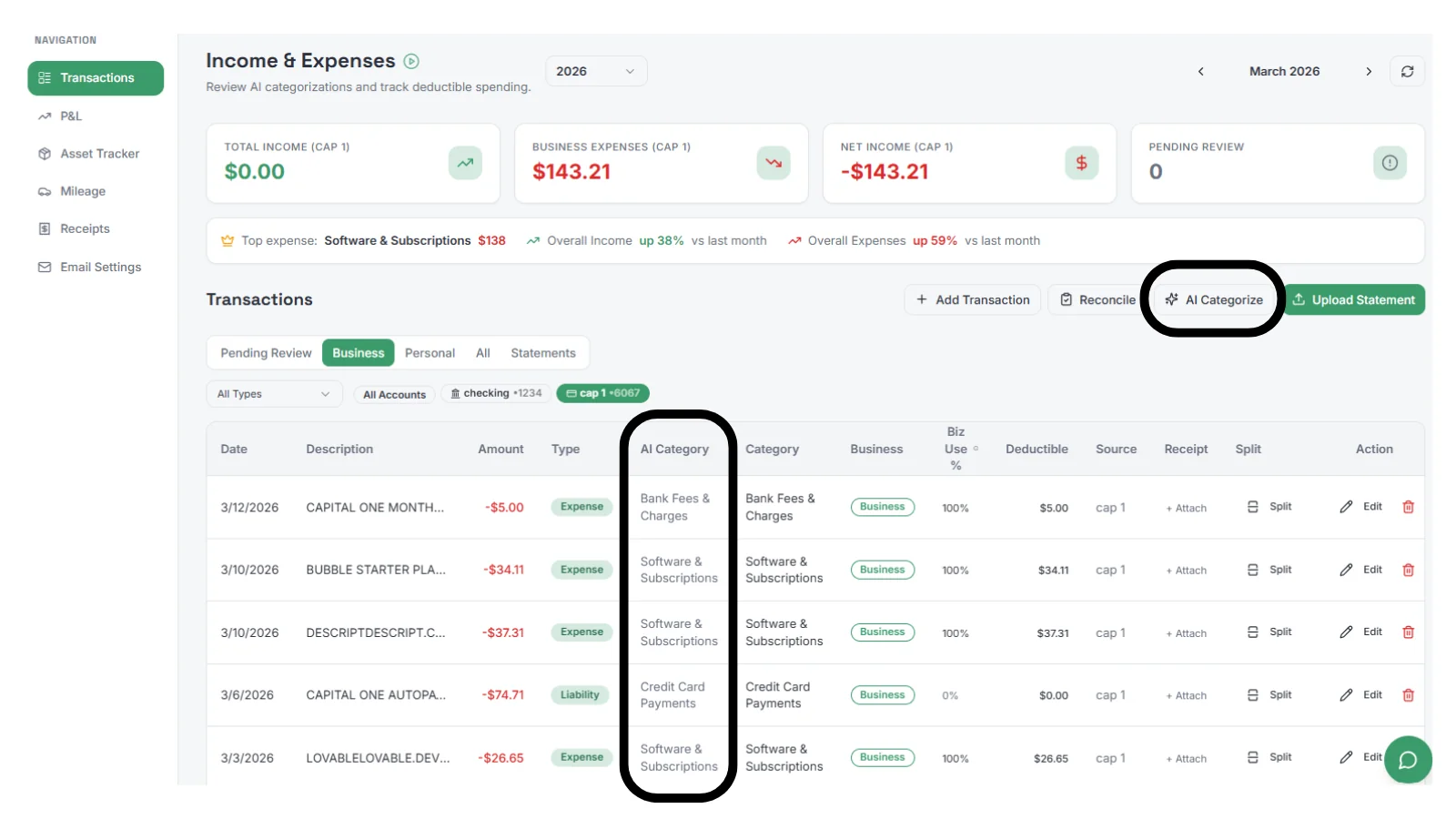
That screen shows SnapTax's AI expense categorization - it reads your bank statement, suggests a category for each transaction, and lets you set the business-use percentage. Your AT&T phone bill can be 75% business. Your Amazon purchase can be 100% business or 0%. The deductible amount updates automatically.
Proper categorization isn't just about reducing your tax bill. It's about being able to defend every deduction if the IRS asks. Undocumented or miscategorized expenses are among the most common reasons deductions get disallowed.
And categorization alone isn't enough. The IRS expects you to have receipts for expenses over $75 and documentation on what the expense is used for. It's not enough to just say it was a software subscription, you need to be able to tell the IRS how it was used for your business. Software that manages receipts and allows for AI purpose to be entered (and memorized for recurring transactions) allows you to have a full solution for audit protection.
3. Does it calculate quarterly estimates from actual income?
This is the one most tools get wrong. Quarterly estimated taxes need to be calculated from your actual year-to-date income, not from a static number you entered at the start of the year.
The IRS Form 1040-ES is the official method for calculating estimated payments. It's accurate but requires you to update it manually whenever your income changes. Most contractors don't - because it's tedious - and then wonder why their Q3 payment is wildly off.
Self-employment tax applies to 92.35% of your net self-employment earnings. That's the IRS's adjustment for the employer-equivalent half of FICA. The rate is 12.4% for Social Security (subject to the annual wage base, which also accounts for any W-2 wages you earn) plus 2.9% for Medicare. Many first-time contractors underestimate this because their W-2 rate looked lower - but as a 1099 worker, you're covering both the employee and employer sides of payroll tax.
Good independent contractor accounting software recalculates your estimate every time your income data changes. SnapTax does this monthly - the Tax Insights bar at the bottom of the P&L screen shows your current estimated quarterly tax, effective tax rate, and monthly savings target, all updated from your actual income for that period.
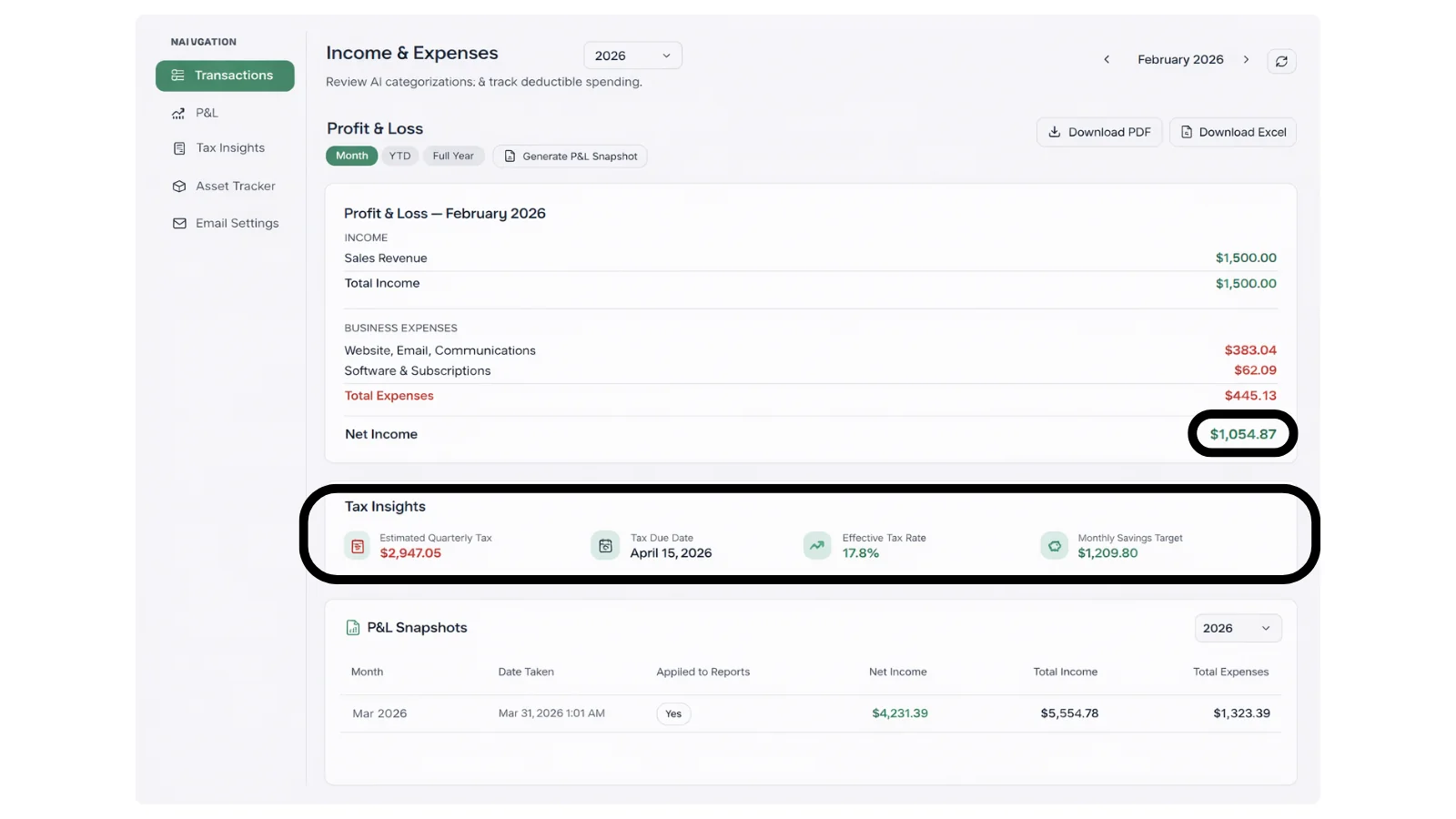
That screen is showing a $2,947.05 quarterly estimate based on February 2026 actual income - not a projection from January, not last year's numbers. The estimate updates every month as income flows in.
4. Does it document deductions in a way that holds up?
Documentation is the part people skip until there's a problem. The IRS can generally audit a return within three years of filing, though that window can extend in certain circumstances - including substantial underreporting of income. If they ask about a deduction, the question isn't whether you had the expense - it's whether you can prove it was business-related.
That means receipts matched to transactions. It means mileage logs with dates, destinations, and business purposes. It means home office documentation. It means keeping everything in one place, organized, audit-ready.
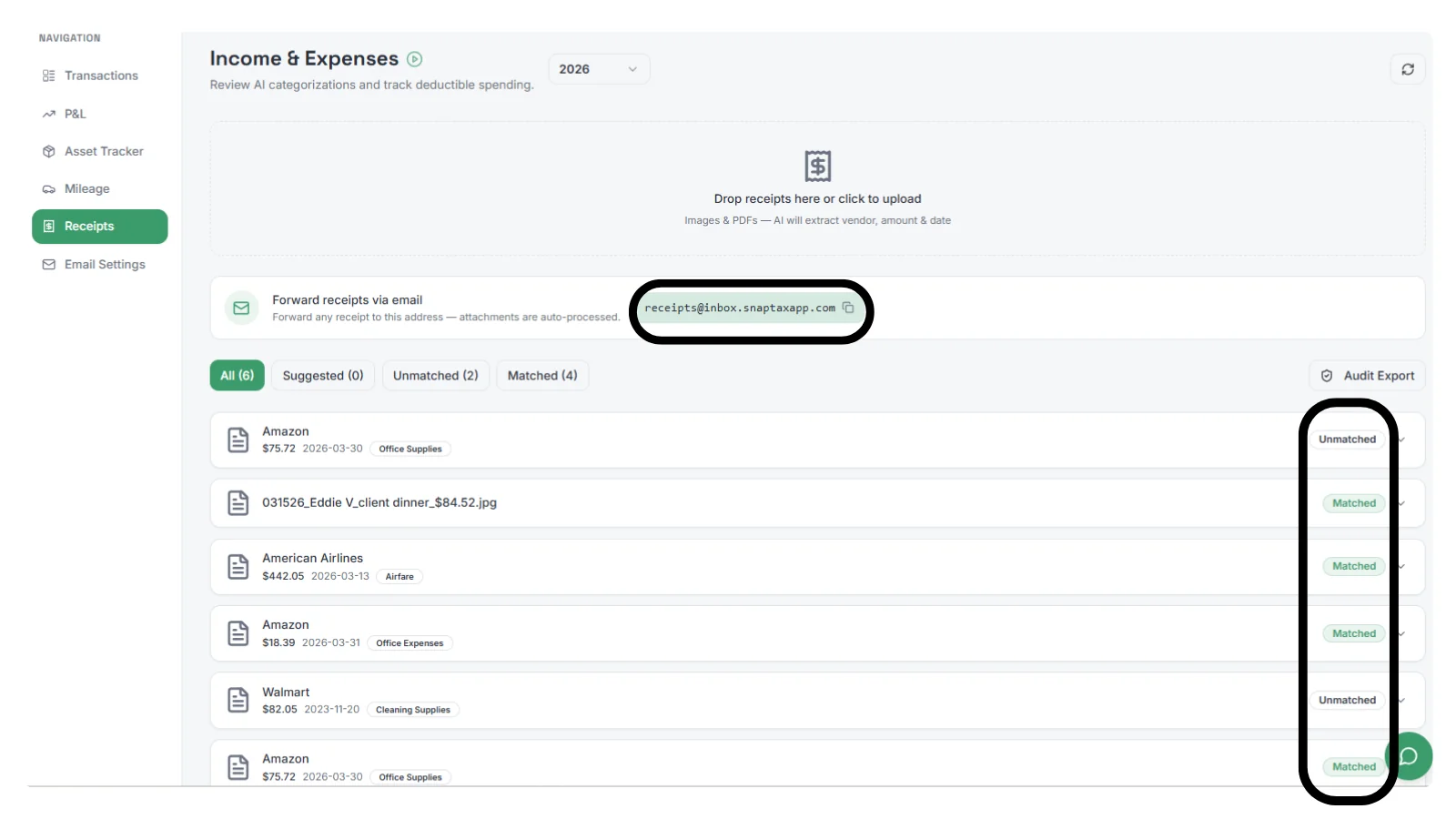
SnapTax's receipt inbox lets you forward receipts by email and they're automatically matched to transactions. You can also drop images and PDFs directly - the AI extracts vendor, amount, and date. A GPS mileage tracker logs trips that flow automatically to your P&L and deduction totals. AI Business purpose helps manage recurring expenses like a cell phone bill or monthly software subscriptions without having to enter a business purpose for every expense.
Why do most accounting tools miss the mark for independent contractors?
The honest answer is that accounting software was built for a different problem. Double-entry bookkeeping - where every transaction is recorded with corresponding entries across accounts to keep the books in balance - is the foundation of traditional accounting. It exists because businesses need auditable financial statements. Independent contractors don't need auditable financial statements. They need accurate quarterly tax estimates and documented deductions.
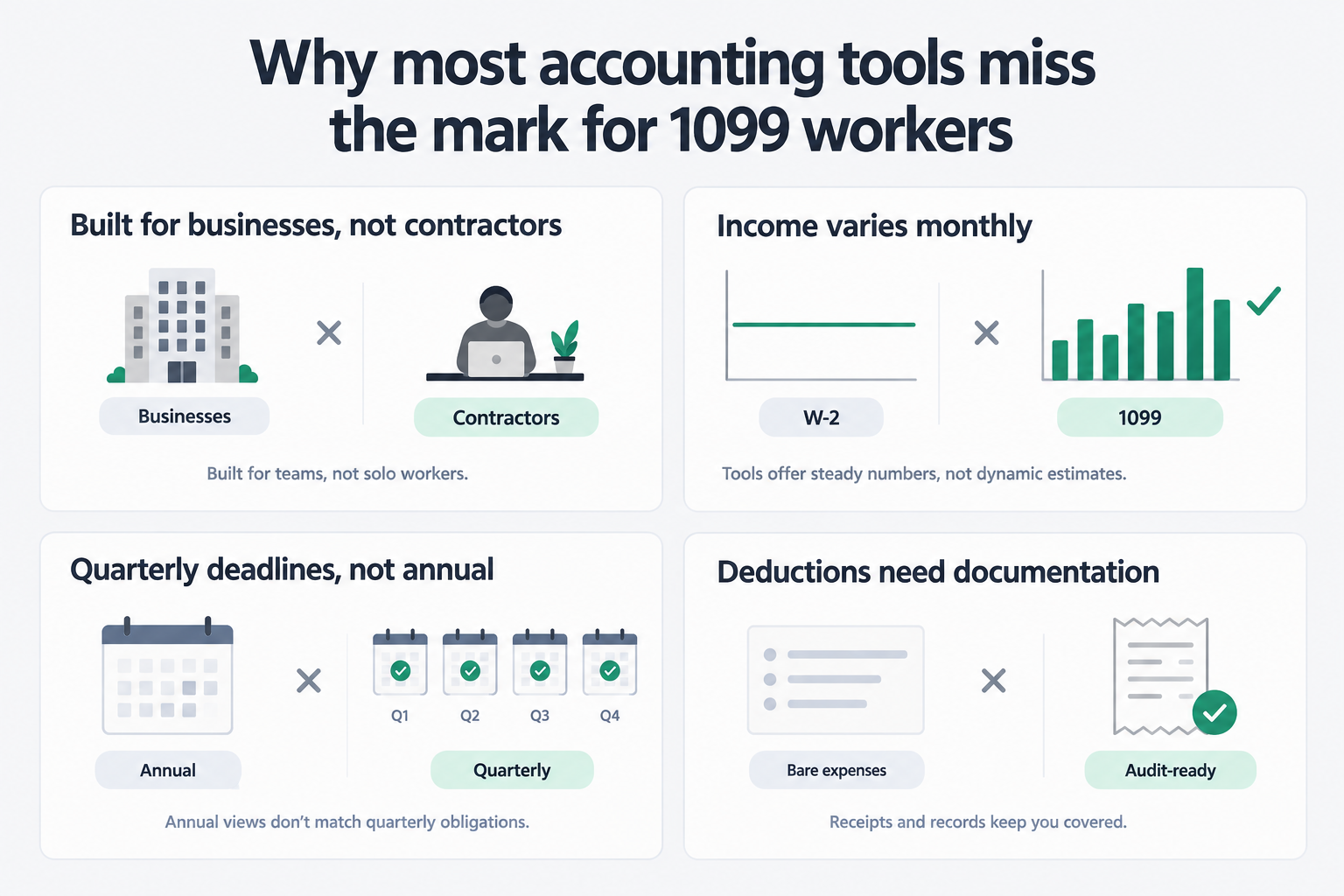
Here's the comparison of what matters for each:
Feature | Full accounting software | Independent contractor needs |
|---|---|---|
Double-entry bookkeeping | Required | Usually not needed |
Payroll processing | Required | Not applicable |
Accounts payable/receivable | Required | Usually not applicable |
Quarterly tax estimates | Partial or manual | Core feature needed |
Variable income handling | Basic | Critical |
Self-employment tax calculation | Not typically included | Must-have |
Mileage tracking | Rarely included | Frequently needed |
Safe harbor calculation | Not typically included | Important for penalty avoidance |
Deduction documentation | Basic | Must be thorough |
The "self-employed" versions of major platforms (QuickBooks Solopreneur, FreshBooks, Wave) reduce the complexity but don't fundamentally reframe the problem. They still organize data around invoicing workflows and general ledger concepts that most contractors have no use for.
What a 1099 contractor needs is software that starts from the tax liability, not the balance sheet. The question isn't "what's my chart of accounts?" It's "what do I owe this quarter, and am I saving enough to cover it?"
What to actually look for in independent contractor accounting software
Here's what I'd evaluate when choosing a tool:
Income tracking:
Can it handle multiple income sources?
Can it blend W-2 and 1099 income into a single estimate?
Does it track income monthly, not just annually?
Does it handle investment gains?
Does it take into account other deductions outside the business that affect quarterly tax payments?
Expense categorization:
Does it read bank statements automatically?
Does it handle mixed personal/business accounts?
Can you set a business-use percentage per transaction?
Does it flag high-audit-risk expenses?
Quarterly estimates:
Does it recalculate monthly as income changes?
Does it calculate the self-employment tax correctly (applied to 92.35% of net SE earnings, accounting for the Social Security wage base and any W-2 wages)?
Does it account for state taxes in addition to federal?
Does it show you a monthly savings target so you're not scrambling at deadline time?
Deduction documentation:
Receipt capture and matching?
Reporting on Audit risks - missing receipts?
GPS mileage tracking?
Audit-ready export?
Safe harbor:
Does it calculate whether you qualify for safe harbor? Safe harbor means you've paid enough in advance that the IRS won't charge an underpayment penalty - even if you end up owing more when you file. You qualify by meeting one of two thresholds: paying 90% of the current year's actual tax liability, or paying 100% of last year's tax (110% if your prior-year AGI exceeded $150,000, or $75,000 if you file married filing separately). The prior-year safe harbor only applies if last year's return covered a full 12-month period.
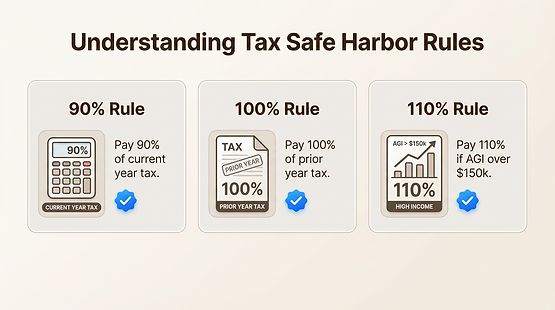
Most accounting tools don't surface the safe harbor calculation at all. It's one of the most practically useful things a contractor can know, and it's almost never front and center.
A good independent contractor accounting software stack isn't complex. It should do those four jobs - income, expenses, estimates, documentation - and stay out of the way for everything else.
Try SnapTax
SnapTax was built from scratch for 1099 workers and independent contractors. The core differentiator is monthly recalculation - your quarterly tax estimate updates automatically every month as income changes, so you're never guessing or working off stale numbers from January.
The Builder plan ($19.99/month after a 30-day free trial) handles AI expense categorization from bank statement uploads, the "Is This Deductible?" wizard for individual expenses, receipt management, GPS mileage tracking, and full P&L reporting. There's a free tier for basic annualized tax liability calculation if you want to start there. A 30-minute onboarding session with Crystal Harrison (SnapTax's founder) is available as a $49 add-on if you'd rather get set up with your actual numbers from day one.
All trials require a credit card. No contracts. Cancel any time.
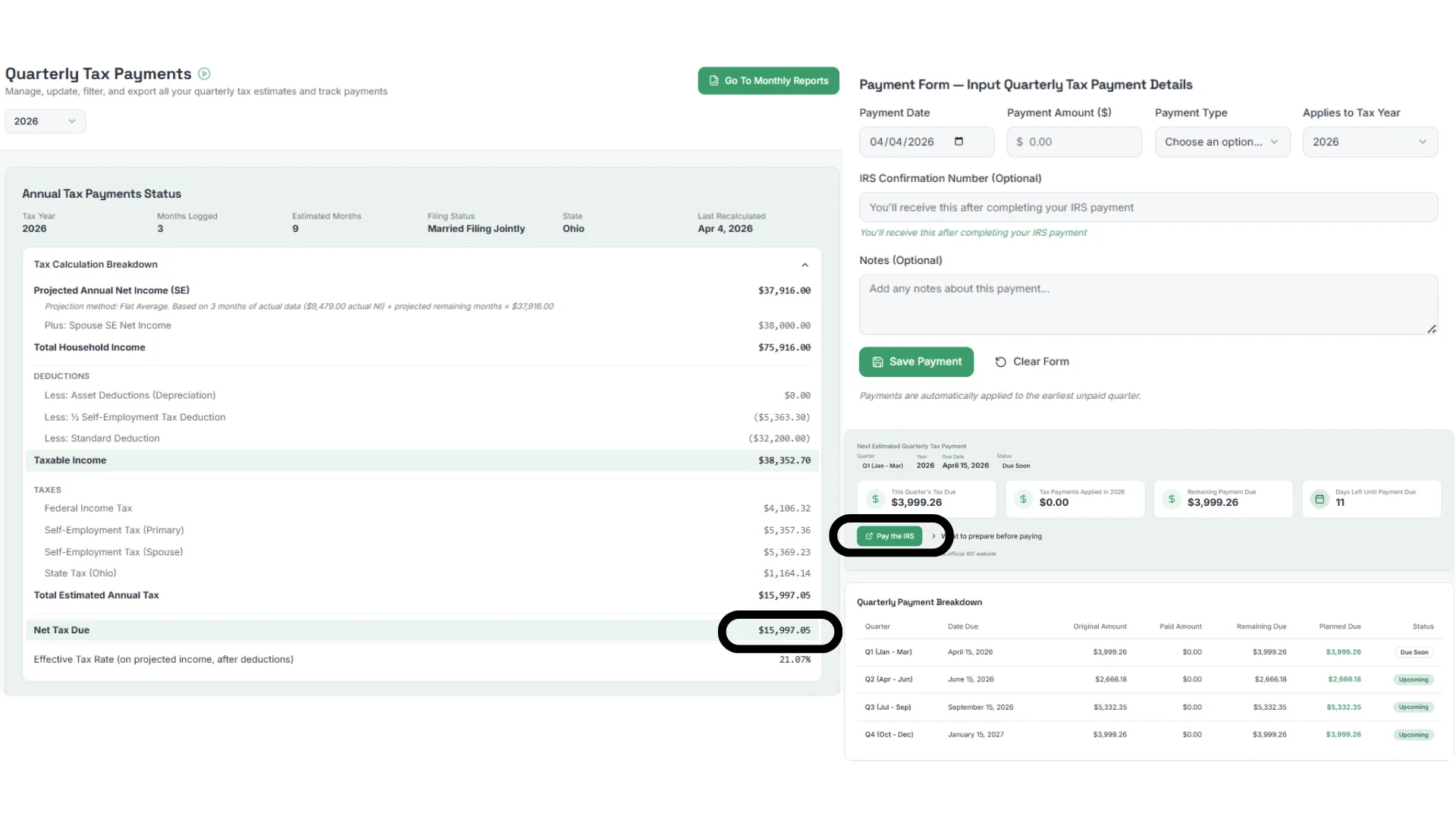
That screen shows what the quarterly tax breakdown looks like for a real user - federal income tax, self-employment tax (primary and spouse), state tax, total estimated annual tax, and each quarterly payment with its due date and status. No general ledger. No payroll tabs. Just the information a contractor actually needs to stay current with the IRS.
Coming Soon: Customers & Vendors (Builder & Optimizer)
Added October 11, 2026
We're building a Customers & Vendors hub inside SnapTax for Builder and Optimizer plans. It will include a customer directory and vendor registry, simple invoicing, AI payment matching that links incoming deposits to open invoices, and a 1099 Center that flags every vendor you paid $2,000 or more in 2026, generates 1099-NEC and 1099-MISC forms, and exports year-end filing files for Track1099 or the free IRS IRIS portal. It's in active development — see what's coming.
Frequently Asked Questions
What accounting software do most independent contractors actually need?
Many independent contractors need four core things: income tracking, expense categorization, quarterly tax estimates, and deduction documentation. They don't need double-entry bookkeeping, payroll processing, or inventory tracking. Tools built around these jobs - like SnapTax - are often a better fit than full accounting platforms designed for businesses with employees.
Do independent contractors have to use accounting software?
No, but tracking income and expenses in some organized system is essential. Without it, you'll miss deductions and get your quarterly estimates wrong. A spreadsheet can technically work, but software that automatically categorizes transactions and calculates your quarterly estimate from real income data saves hours per quarter and reduces the risk of an IRS underpayment penalty.
Is QuickBooks or FreshBooks overkill for a 1099 worker?
For many independent contractors, yes. General-purpose platforms like QuickBooks (which now markets QuickBooks Solopreneur to self-employed users) and FreshBooks are built around invoicing, time-tracking, and general ledger functions. Neither was purpose-built around quarterly tax estimates for variable income - which is the core problem most 1099 workers actually need solved. SnapTax focuses specifically on that gap.
How do I calculate my quarterly estimated taxes as an independent contractor?
Estimated quarterly payments are based on your total projected tax liability for the year - federal income tax, self-employment tax, and state income tax if applicable - minus any withholding and prior payments. Self-employment tax applies to 92.35% of your net self-employment income at a combined rate of 15.3% (12.4% for Social Security up to the annual wage base, plus 2.9% for Medicare). Federal income tax depends on your bracket and total household income, including any W-2 wages. The IRS safe harbor - paying either 90% of your current year's actual tax or 100% of last year's tax (110% if your prior-year AGI exceeded $150,000) - protects you from underpayment penalties if you meet the threshold. The challenge for most 1099 workers is that variable income makes every estimate a moving target. SnapTax recalculates your quarterly estimate every month as income changes, so you're never working off stale numbers.
What's the free tier of SnapTax?
SnapTax offers a permanent free tier for users who want a basic annualized program to calculate their tax liabilities. It's not a trial - it doesn't expire. Paid plans start at $4.99/month after a 30-day free trial (credit card required for the trial). All plans come with no contracts and you can cancel any time.
