Real-time deduction tracking for self-employed: 2026 guide
Crystal Harrison · April 24, 2026 · 10 min read
Real-time deduction tracking for self-employed workers: 2026 guide
The average self-employed worker misses between $3,000 and $6,000 in legitimate tax deductions every year. It is not because those deductions do not exist, but because they were not tracked when they happened. A receipt thrown away in February, a mileage trip not logged in July, or a software subscription forgotten by December (all these small oversights add up to a massive tax bill come April).
I built SnapTax after more than two decades of watching freelancers leave money on the table. After two decades as a professional bookkeeper, I saw the same cycle repeat: solopreneurs work hard all year, only to get hit with a tax bill they did not see coming because they were acting as their own (often disorganized) accountants. Real-time deduction tracking fixes this permanently. It moves you from reactive bookkeeping to proactive tax planning, ensuring you never pay a dollar more than you owe.
Why self-employed workers lose thousands in deductions
Tax season typically happens 3 to 12 months after most of your expenses occur. Unless you have a photographic memory, you are probably not going to remember a $47 software subscription from March by the time the next April arrives. This memory problem is the first hurdle in self-employed finance. When you wait until the end of the year to "do the books," you are essentially trying to reconstruct your entire life from a pile of digital ghosts and faded paper.
Many freelancers fall into the "I will deal with it later" trap. You might batch your bookkeeping once a month if you are disciplined, or once a year if you are like most people. The problem is that every month you wait, more deductions disappear. Receipts get lost in your email inbox, deleted from your phone, or never saved in the first place. The IRS does not accept "I probably spent that" as documentation; they require a contemporaneous record.
Then there is the personal and business account problem. Most freelancers use one bank account for everything. When personal expenses are mixed with business expenses, manually reviewing every transaction becomes a tedious chore. Without a system for real-time deduction tracking self-employed, the default behavior is to skip anything that looks complicated. The result is higher taxable income, higher quarterly payments, and a massive annual tax bill that could have been avoided.
What real-time deduction tracking actually means
For a solo business owner, real-time means deductions are captured, categorized, and applied to your tax estimate as they happen (not at year-end). Every time you log a deductible expense, your estimated tax liability should drop immediately. This gives you a clear view of the impact of every deduction in actual dollars saved, rather than just seeing it as a line item on a spreadsheet.
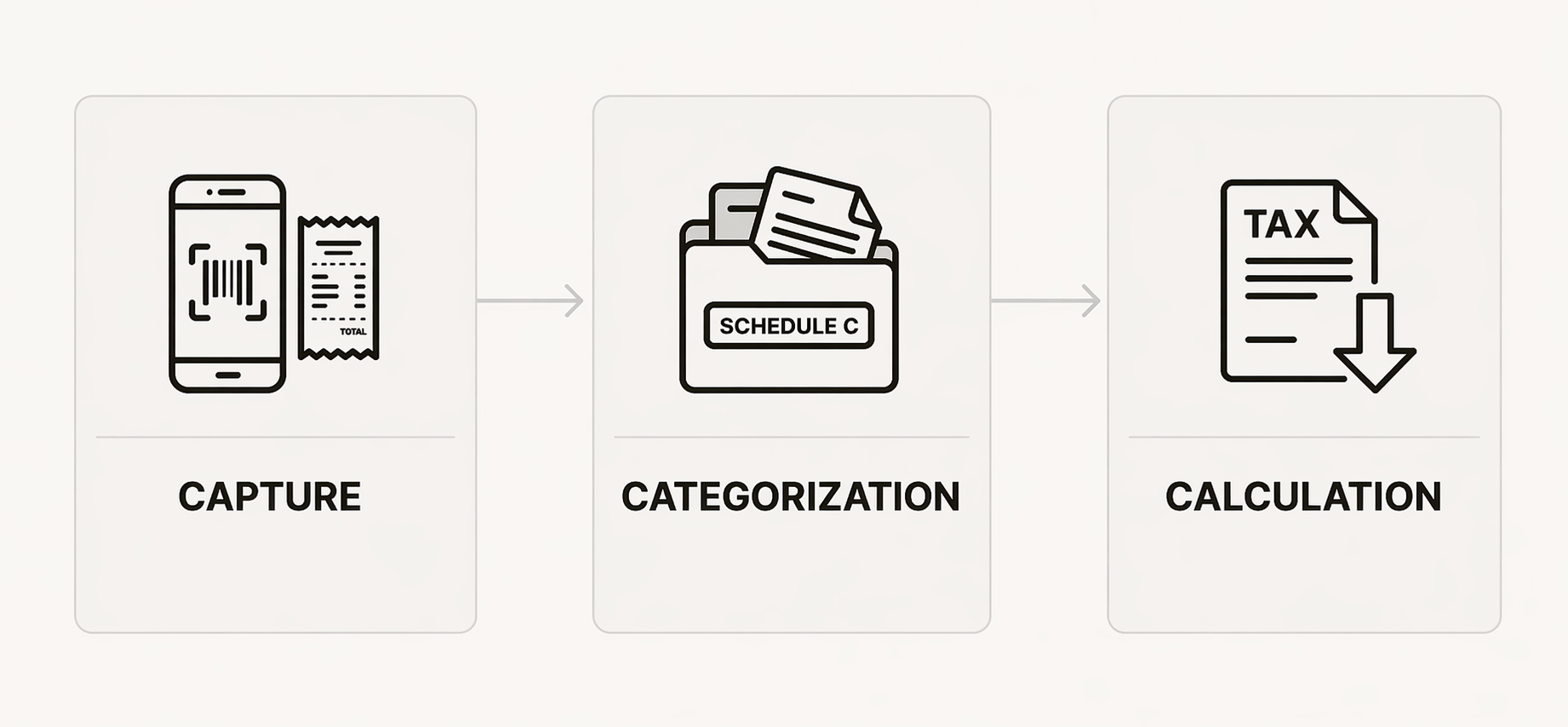
A complete real-time system has three essential pillars:
Capture: Getting the expense into your system at the point of purchase. This usually involves mobile scanning or automatic email fetching so the data is digitized before the receipt can be lost.
Categorization: Assigning the expense to the correct Schedule C category immediately. If you wait, you will forget whether that Amazon purchase was for office supplies or a birthday gift.
Calculation: Automatically applying that deduction to your running tax estimate. This is the "magic" moment where you see your tax bill shrink in real-time.
Most freelancers only have the "capture" part of the system (they save receipts in a folder). But without categorization and calculation, you still have a "shoebox" problem, even if that shoebox is digital. Real-time deduction tracking self-employed combines all three pillars to eliminate tax surprises and keep your cash flow predictable.
The most commonly missed self-employed deductions
If you want to maximize your savings, you need to know where to look. These are the categories where freelancers most often leave money on the table because they feel "too small" or "too complicated" to track in the moment.
Home office expenses
This is perhaps the most underutilized deduction. Many freelancers skip it because they are intimidated by the rules or they undercount it by only claiming rent and forgetting utilities like electricity and water. Whether you use the regular method or the simplified method, this can be a substantial write-off. For more details on what you can claim, see our guide on freelancer tax deductions.
Mixed-use percentage on personal accounts
Your phone bill, internet bill, and even your car are often partially deductible. Most freelancers either claim 0% (missing savings) or 100% (inviting an audit). Both are usually wrong. A real-time system allows you to tag the business-use percentage on these transactions as they occur, ensuring your records are both accurate and maximized.
Professional development
Anything that maintains or improves skills in your current freelance work is deductible. This includes online courses, trade publications, books, and conference fees. These are commonly skipped because they do not "feel" like a traditional business expense in the same way a new laptop does, but they absolutely count.
Software subscriptions
Every tool you use for your freelance work is a deduction. This includes your SnapTax subscription, design software, CRM tools, and cloud storage. Because many of these are monthly and automatic, they are easy to forget when you are looking back at a year of transactions.
Bank and payment processing fees
Do not ignore the fees sitting right in your bank statement. Stripe fees, PayPal fees, and business banking fees are all deductible. Most people never flag them because they are subtracted before the money ever hits their account, but they are a legitimate cost of doing business.
Health insurance premiums
This is an "above-the-line" deduction worth up to 100% of your premiums. It is one of the most valuable deductions exclusively for self-employed workers, yet it is shockingly underutilized because it lives in a different spot on your tax return than most business expenses.
How real-time tracking transforms your quarterly tax strategy
The real power of tracking deductions as they happen is the impact on your quarterly tax payments. Every deduction reduces your net profit. Since self-employment tax and income tax are calculated based on that net profit, real-time deductions lead to a real-time reduction in your quarterly payment targets.
Let's look at a concrete example. Suppose a freelancer earns $8,000 in the first quarter. Without tracking, they might save a flat 30% ($2,400) and hope it is enough. However, if they use real-time deduction tracking self-employed and log $2,100 in legitimate deductions throughout the quarter, their taxable net profit drops to $5,900. At a combined effective rate of roughly 37% (including the 15.3% self-employment tax), they would owe approximately $778 less for that quarter.
When you multiply that across four quarters, you are looking at thousands of dollars staying in your pocket rather than sitting with the IRS until you get a refund. This compounding effect means you can make better business decisions because you always know your actual profit margin. You are not just saving at tax time; you are managing your cash flow like a pro. For a better sense of what you should be setting aside, check our guide on how much freelancers should save for taxes.
Building your real-time system: Manual vs. SnapTax
You can build a real-time system with or without specialized software. The best system is the one you will actually use consistently.
The manual approach
If you are doing it manually, you need to dedicate 15 minutes every Friday to log the week's expenses. Use a consistent folder system for receipts (either digital or physical) and keep a running spreadsheet with Schedule C categories as your columns. Review your bank statement weekly rather than monthly to ensure nothing is missed.
The problem with manual systems is that they work until they do not. One busy week can break the chain, and categorization errors are common if you do not have IRS guidance built-in. There is also no automatic connection between your spreadsheet and your quarterly tax estimate.
The SnapTax approach
We designed our SnapTax Builder bundle to remove the friction that makes manual systems fail. Instead of a spreadsheet, you get a system that does the heavy lifting for you:
Bank statement upload: Our AI engine categorizes transactions automatically, sorting them into business and personal categories in seconds.
Hybrid tracking: You do not need a separate business account. You can tag a business-use percentage on any transaction, and SnapTax handles the math for your tax plan.
Mobile capture: Document your expenses at the point of purchase. Snap a photo of a receipt or forward an email, and we match it to the transaction for audit readiness.
W2 + 1099 support: If you have a day job and a side hustle, we provide a unified tax estimate that accounts for both income streams.
Feature | Manual Spreadsheet | SnapTax Builder |
|---|---|---|
Capture Speed | Slow (manual entry) | Instant (AI categorization) |
Tax Estimate | Rough guess | Real-time (IRS tax tables) |
Audit Readiness | Low (missed receipts) | High (digital matching) |
Pricing | Free | $19.99/mo |
What documentation you need to keep to stay audit-ready
Staying audit-ready is about having the right evidence for every claim you make. As a rule of thumb, you should follow the $75 rule from IRS Publication 463. This means you need a receipt or record for every business expense over $75 (though you always need a receipt for lodging, regardless of the cost). For smaller expenses, a detailed log entry is often sufficient, but keeping the receipt is always the safer bet.
For specific types of deductions, the documentation requirements are stricter:
Mileage: You must keep a contemporaneous record that includes the date, destination, business purpose, and total miles driven. For more on this, see our mileage documentation guide.
Mixed-use items: Keep a written record of how you determined the business-use percentage for things like your cell phone or home office.
Meals: Record who was present and what business was discussed.
Retention: You should keep all your records for at least 3 years from the date you filed the return.
The IRS does not audit people because they are disorganized; they audit people whose numbers look wrong. Real-time deduction tracking for self-employed makes your numbers look exactly right because they are right.
Stop guessing and start knowing your tax liability with SnapTax
Real-time deduction tracking is not a chore; it is a habit supported by the right system. The freelancers who pay the least in taxes are not the ones with the most expensive accountants; they are the ones who tracked their business throughout the year. You don't need to become an accountant to win at taxes. You just need to stop guessing.
If you are ready to replace tax-time panic with clarity, I invite you to try our SnapTax Starter plan free for 30 days. It includes quarterly tax estimates and manual logging to get you started. When you are ready for AI categorization and mobile receipt storage, our Builder bundle is there to handle the heavy lifting for you.
Frequently Asked Questions
What deductions can self-employed workers claim in 2026?
Self-employed workers can claim a wide range of deductions including home office expenses, mileage, software subscriptions, professional development, and health insurance premiums. Using real-time deduction tracking self-employed ensures you capture these as they happen.
How do I track business expenses if I use a personal bank account?
You can use a system like SnapTax to tag a business-use percentage on transactions within your personal account. This allows for real-time deduction tracking self-employed without needing to open separate business banking.
What is the best app for tracking self-employed deductions?
The best app depends on your needs. QuickBooks is standard for full accounting, while SnapTax is designed specifically for solo contractors who want real-time deduction tracking self-employed without complex jargon.
How does real-time deduction tracking self-employed reduce quarterly tax payments?
Every logged deduction reduces your net profit. Since your quarterly tax targets are based on that profit, real-time deduction tracking self-employed allows you to lower your payments immediately as you spend.
Do I need receipts for every business expense?
Generally, you need receipts for expenses over $75, except for lodging which always requires one. However, real-time deduction tracking self-employed is most effective when you capture all receipts to build a robust audit trail.
Can I deduct expenses I forgot to track during the year?
Technically yes, if you can find proof, but you will likely miss many small items. Real-time deduction tracking self-employed prevents these 'forgotten' deductions from costing you money.
