Real-Time Quarterly Tax Tracking for Freelancers (Avoid IRS Penalties)
Crystal Harrison · April 22, 2026 · 9 min read
Real-time quarterly tax liability tracking for freelancers
I have spent more than two decades as a professional bookkeeper watching the same thing happen to freelancers every quarter. The deadline approaches, April 15, June 16, September 15, and they scramble to figure out what they owe. Not because they weren't paying attention. Because no tool was telling them the number in real time. That is exactly why I built SnapTax.
For two decades, I served small businesses throughout Texas. I saw firsthand that most business owners are excellent at running their operations, but financial planning and tax preparation always fall behind. That gap creates stress, uncertainty, and expensive mistakes. We created SnapTax to close that gap and give independent contractors a simpler, more reliable way to plan taxes without complex accounting software.
Why quarterly taxes are harder for freelancers than anyone else
As a 20-year bookkeeper, I have seen that the "quarterly scramble" isn't a lack of discipline. It is a failure of systems. Traditional employment comes with a stable W-2 paycheck where taxes are quietly withheld every payday. You never see the money, so you never have to "miss" it. But as a freelancer, you are now the employer. No one is automatically withholding for you.
Freelancers face unique challenges that make traditional quarterly taxes for freelancers difficult to manage. First, there is the unpredictability of income. One month you might have a $10,000 project payout, followed by a month with zero income. Income tax rates are based on your total annual earnings, making it a moving target.
Then there is the "forgotten" self-employment tax. This 15.3% tax covers Social Security and Medicare. It catches almost every new soloist off guard because it is applied on top of federal and state income taxes. Finally, there is the software problem. Most accounting tools like QuickBooks Solopreneur are built for businesses with employees. They use a "chart of accounts" and jargon that feels like Greek to someone who just wants to write code, design logos, or drive for a rideshare app.
What real-time quarterly tax tracking actually means
Real-time quarterly tax liability tracking is not just looking at your bank account at the end of the month. It is a living, breathing number that moves as you earn and spend. Most freelancers treat tax tracking as a "historical recording" event. They wait until the end of the quarter or the year to reconcile their books. By then, the money for those taxes might already be spent.
Proactive freelancer tax planning is the opposite. It means knowing that if you get paid $500 today, you owe a specific portion of that to the IRS immediately. When your income changes, your estimate should change with it. This is critical because the IRS requires you to "pay as you go" if you expect to owe more than $1,000 for the year.
If you wait until the deadline to figure it out, you risk getting hit with underpayment penalties. For 2025, the annual penalty rate for underpayment is 8%. Real-time tracking gives you the clarity to save with confidence so you are never surprised by a bill you cannot pay.
The three components of your quarterly estimate
You aren't just paying one single tax to the government. When we calculate your real-time quarterly tax liability tracking, we look at three distinct layers. Each one has its own rules and thresholds.
1. Federal Income Tax
This is the standard tax on your earnings. It is progressive, meaning your tax bracket increases as you earn more. This is why a flat 25% savings rule often fails. If you earn $40,000, your effective rate is much lower than if you earn $140,000. Accurate tracking needs to account for these shifts as your year progresses.
2. Self-Employment (SE) Tax
This is the big one that freelancers often overlook. It is a flat 15.3% rate that consists of 12.4% for Social Security and 2.9% for Medicare. Because you are both the employer and the employee, you pay both halves of this tax. You can use our 1099 tax calculator to see how this impacts your specific numbers.
3. State Tax
Depending on where you live, you may also owe state estimated taxes. States like California require payments if you expect to owe more than $500, while New York has a lower threshold of $300. Tracking this in real-time ensures you are meeting local obligations alongside federal ones.
What feeds into a real-time estimate and what most tools miss
Most tax tools are built for accountants who reconcile books once a month. They miss the nuances that actually drive your tax bill down for soloists. Let's break down the common gaps in traditional software.
The bank connection requirement
Tools like QuickBooks Solopreneur or FreshBooks heavily emphasize direct bank connections.
While this can automate some data entry, it creates a "black box" where transactions are often miscategorized. It also creates a barrier for freelancers who prefer privacy or manual control. We built SnapTax to work without forced connections, allowing for drag-and-drop statement uploads that you control.
Partial business-use percentage
This is the most common feature missing from mainstream tools. As a freelancer, you likely use your cell phone, your home internet, or even your personal vehicle for both business and personal life. Most software is all-or-nothing. SnapTax allows you to tag a business use percentage on any transaction. If 50% of your phone bill is for business, only 50% of that cost flows into your tax estimate.
Real-time mileage and depreciation
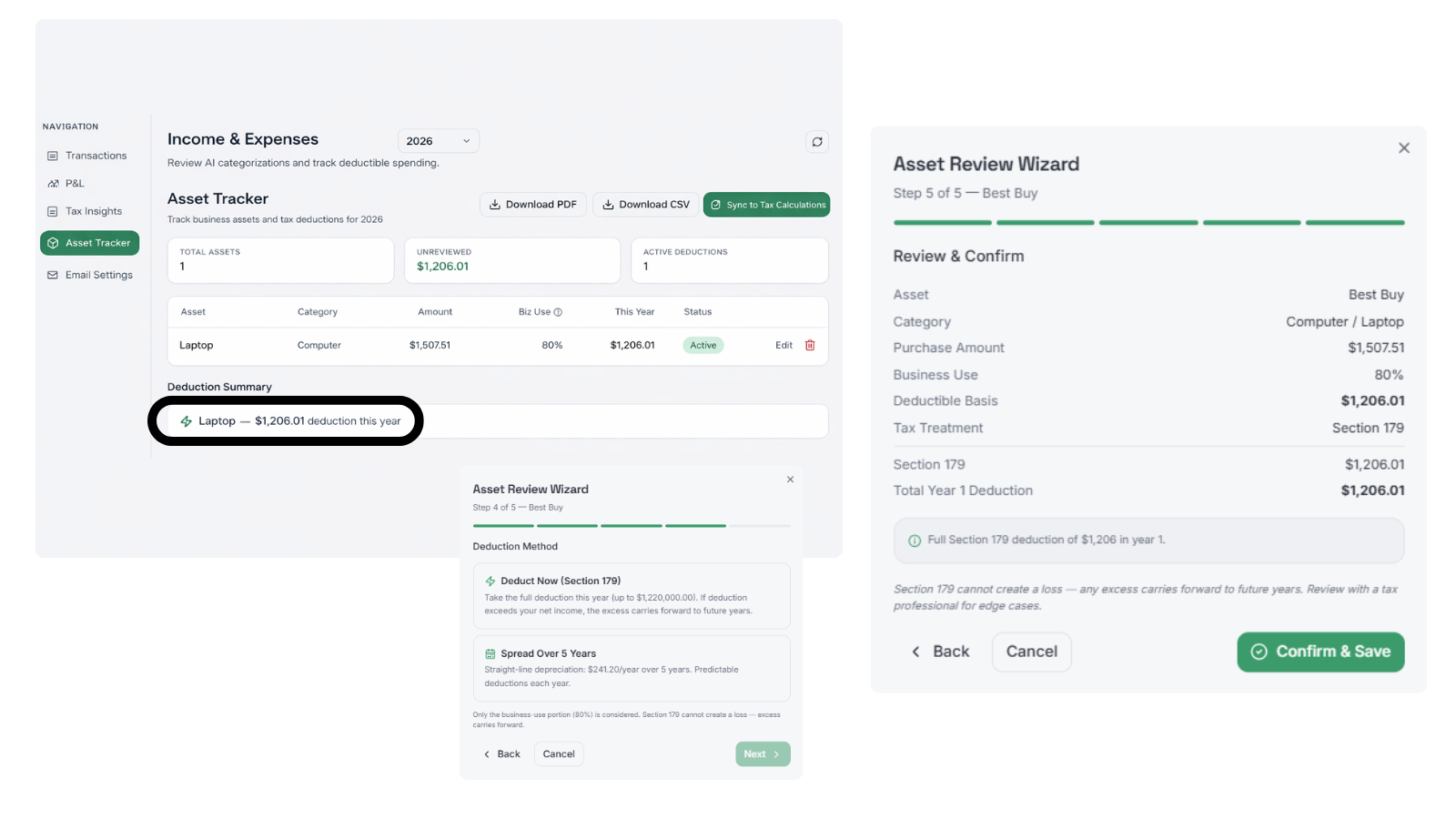
Many freelancers treat mileage and big equipment purchases as "year-end" items. But a mileage deduction at the 2026 IRS standard rate should lower your tax liability today, not just in April. The same applies to equipment deductions. If you buy a $3,000 laptop, your quarterly estimate should drop immediately to reflect that new deduction.
How to track your quarterly tax liability in real time with SnapTax
Gaining clarity over your finances doesn't have to be a full-time job. Here is how our process works to help you "know what you owe" every single day.
Step 1: Set up your financial snapshot
When you first log in, you will configure your profile. You can choose from three different projection methods: Flat, Growth, or Seasonal. This ensures that if your business is boom-or-bust, your tax estimates reflect that reality rather than a generic average.
Step 2: Log income and expenses
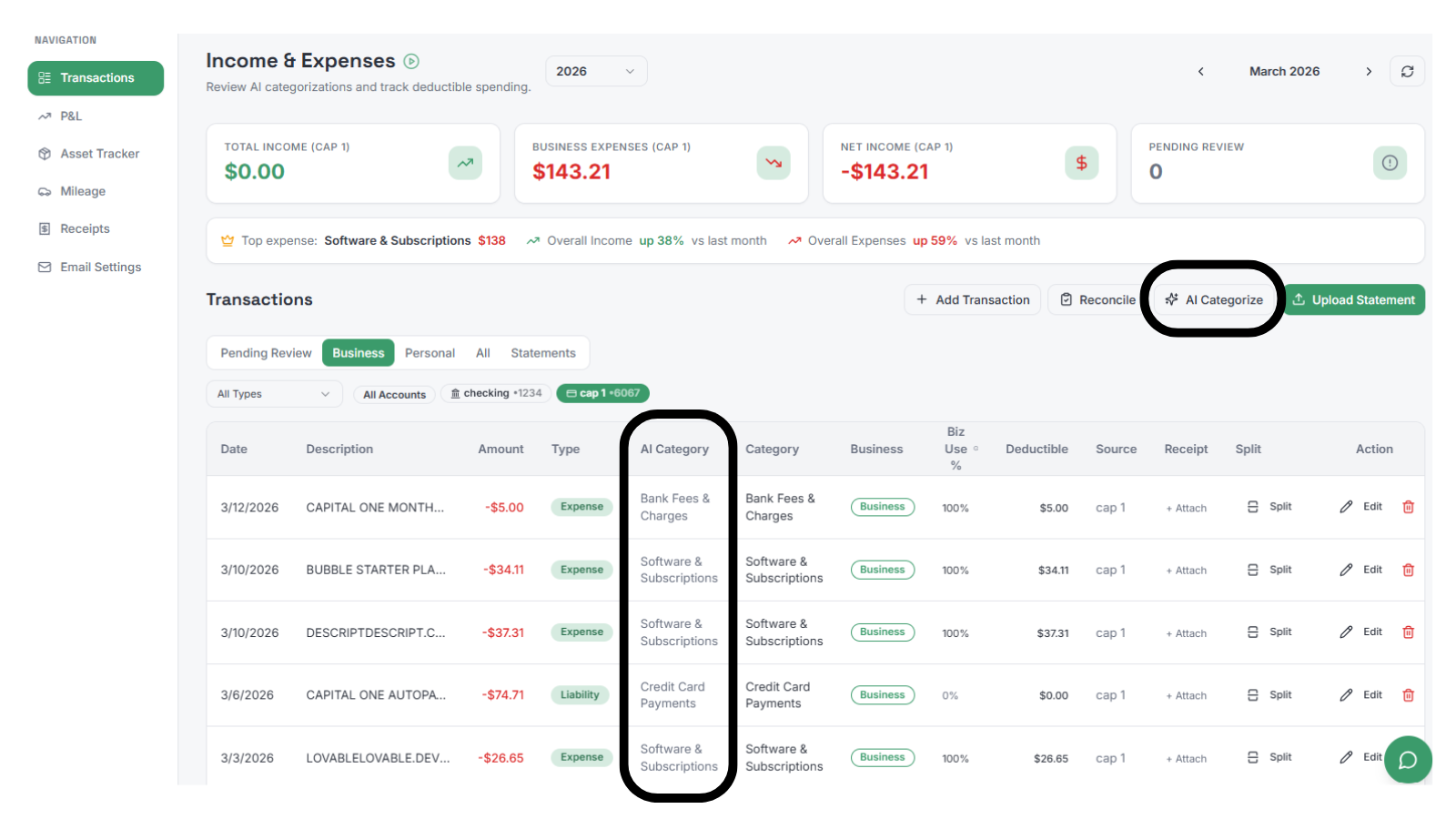
You can enter your data in minutes each month. If you are using our Builder plan, you can simply upload your bank statements. Our AI handles the heavy lifting of categorization while giving you the freedom to tag "partial business use" where it makes sense.
Step 3: Apply smart alerts
We don't expect you to live in the app. Our system provides smart alerts for quarterly tax deadlines and missing data. If your income spikes and your required payment changes, we will let you know so you can adjust your savings goals.
Step 4: Pay with confidence
When the deadline arrives, you won't need to scramble. Your dashboard shows your exact remaining balance for the quarter with direct links to IRS payment portals. You can see your full tax breakdown, including federal, state, and SE tax, all in plain English.
Comparing tax planning solutions for freelancers
Choosing the right tool depends on your stage of business. While some tools focus on invoicing and client management, SnapTax focuses specifically on the tax planning needs of the soloist.
Feature | QuickBooks Solopreneur | FreshBooks | |
|---|---|---|---|
Monthly Price | Starts at $4.99 | $20.00 | Starts at $23.00 |
Free Trial | 30 Days (Starter) | Half price for 30 days | 30 Days |
Business Use % | Yes | Limited | No |
Tax-First Focus | Yes | Accounting-First | Invoicing-First |
Real-Time P&L | Yes | Yes | Yes |
Real-time quarterly tax tracking is the difference between guessing and knowing
Real-time quarterly tax liability tracking is not a luxury feature. For a freelancer with variable income, it is the difference between paying the right amount each quarter and getting hit with an IRS penalty for underpayment. SnapTax was built to give every 1099 worker the same clarity that used to require a bookkeeper. We want you to focus on the work you love, knowing your taxes are handled.
Try SnapTax free for 30 days, no credit card required
Ready to stop guessing and start knowing your taxes? You can explore all our features and get your first tax estimate without any commitment. If you have more questions, our tax faq covers everything from filing requirements to specific deduction rules.
Frequently Asked Questions
How does real-time quarterly tax liability tracking save me money?
Real-time tracking allows you to see deductions like mileage and equipment depreciation as they happen. This lowers your estimated payment immediately, improving your monthly cash flow rather than waiting for a refund at year-end.
Do I need a professional bookkeeper to use real-time quarterly tax liability tracking?
No. We built SnapTax specifically so you can manage your own tax planning without a degree in accounting. Our 'plain English' approach and AI categorization do the heavy lifting for you.
Is real-time quarterly tax liability tracking accurate for variable income?
Yes. Unlike static calculators that assume you earn the same amount every month, real-time tracking adjusts your annual projection every time you log a new invoice or expense.
Can I use real-time quarterly tax liability tracking if I have a single bank account?
Most tools struggle with this, but SnapTax was designed for it. You can tag 'partial business use' on transactions, allowing you to separate personal spending from deductible business expenses in one account.
What happens if I miss a deadline while using real-time quarterly tax liability tracking?
Our smart alerts will notify you of upcoming deadlines so you stay ahead. If you do miss a payment, the tool helps you calculate exactly what you owe to get back on track and minimize potential IRS interest charges.
How does real-time quarterly tax liability tracking handle state taxes?
The system pulls current state tax tables and applies them to your net profit alongside federal rates. This gives you a complete picture of your total tax obligation, not just the federal portion.
Can I export my data from real-time quarterly tax liability tracking for tax season?
Yes. You can export your Profit & Loss reports and specific tax-ready files (like TXF for TurboTax) to make the final filing process as fast as possible for you or your CPA.
