How to Separate Business and Personal 1099 Expenses Automatically
Crystal Harrison · October 15, 2026 · 9 min read
How to separate business and personal 1099 expenses automatically
The IRS doesn't require a separate bank account for 1099 filers. Here's how AI categorization handles mixed-use expenses, business use percentages, and split transactions automatically.
October 15, 2026 · 6 min read
TL;DR
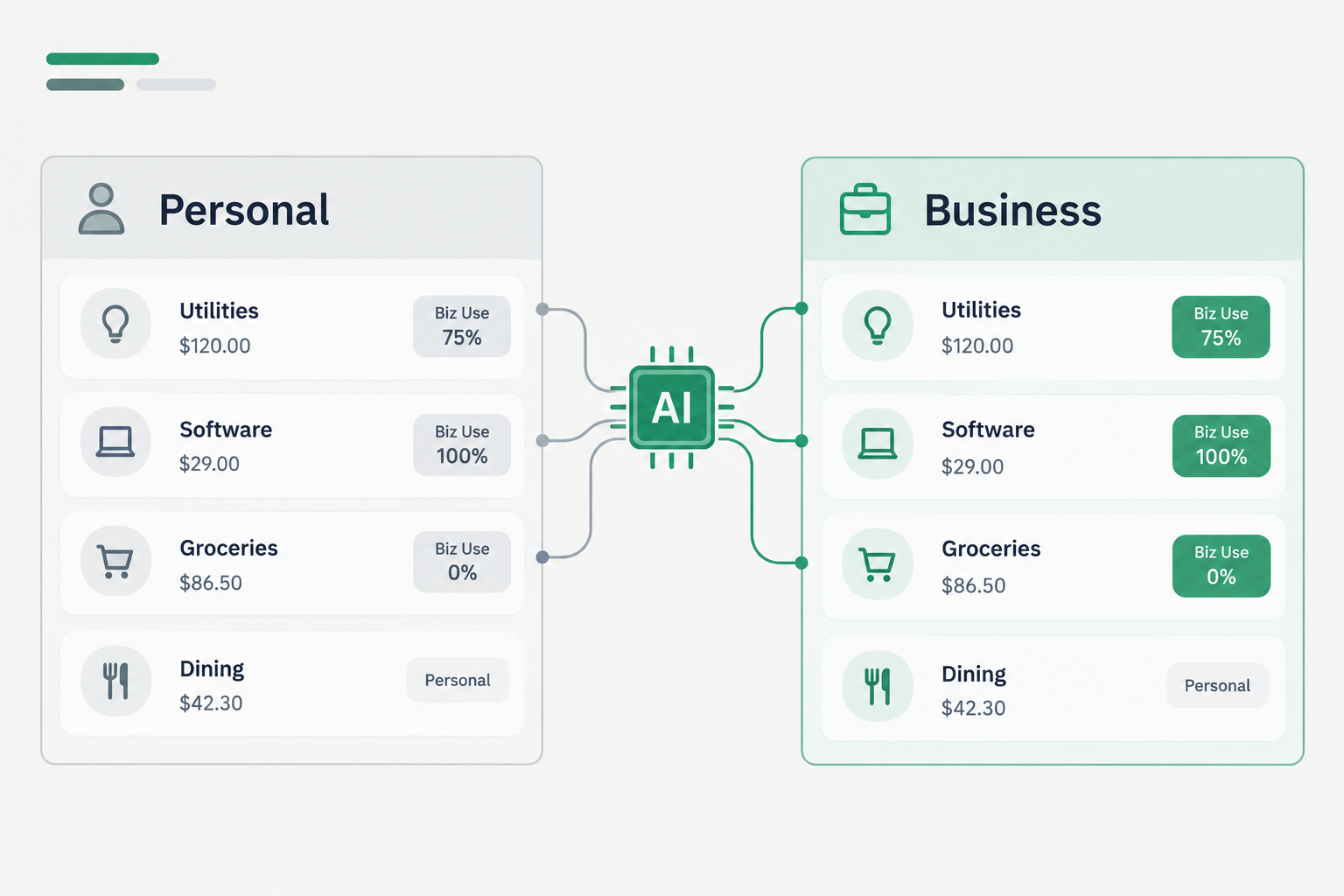
For a sole proprietor, paying a business expense from a personal bank account does not automatically make it nondeductible - what matters is establishing the expense's eligibility, business purpose, amount, and supporting records. SnapTax helps you organize transactions from mixed accounts: upload a supported bank statement, review AI-suggested categories, and enter your business-use allocations for shared expenses. SnapTax performs the allocation math and organizes reviewed transactions into a P&L report. You remain responsible for confirming eligibility, business purpose, and supporting records for each expense.
Do you actually need a separate bank account for 1099 expenses?
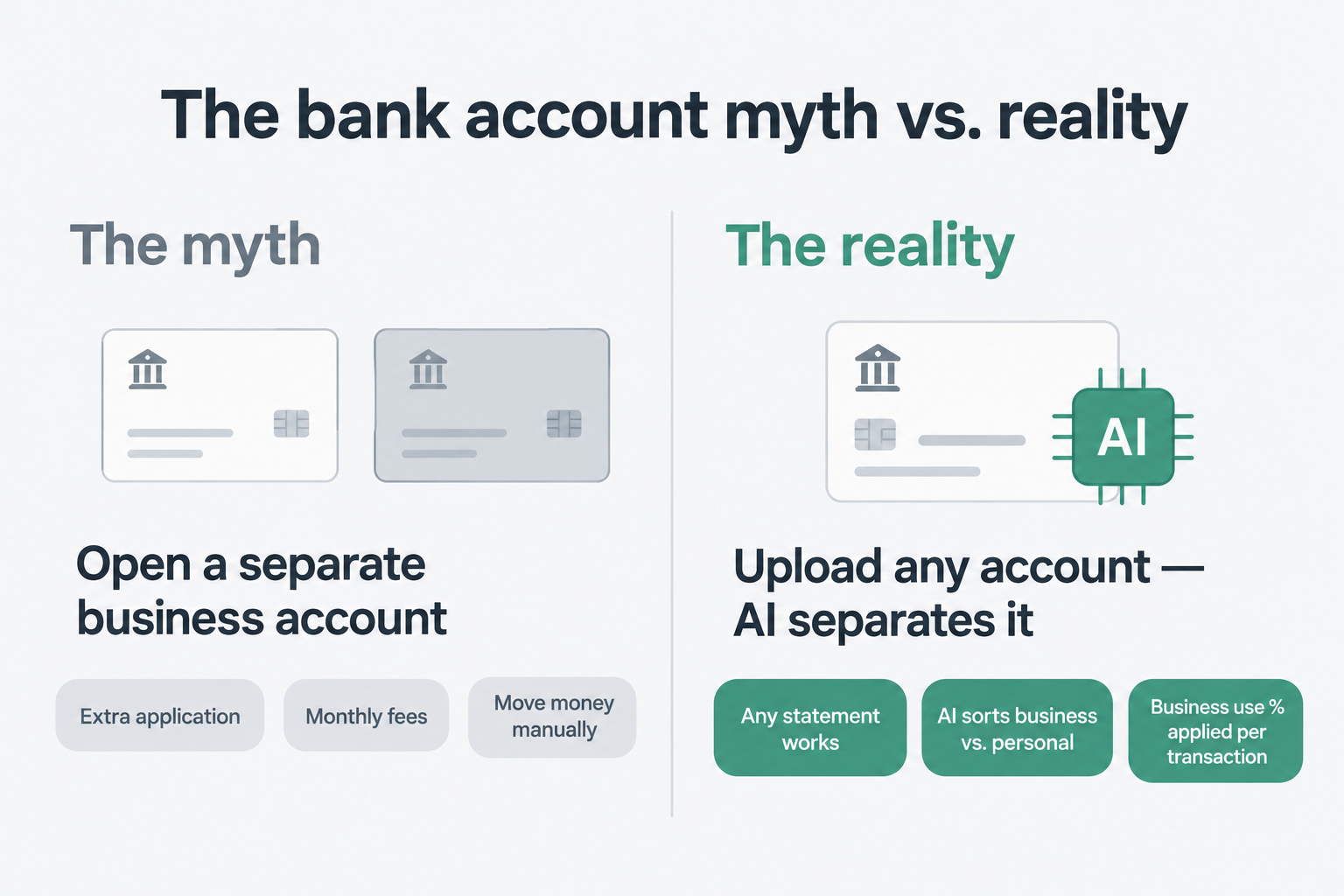
For a sole proprietor, paying a qualifying business expense from a personal account does not automatically make it nondeductible. The key is establishing the expense's eligibility, business purpose, amount, and supporting records. IRS Publication 583 recommends keeping a separate business checking account because doing so simplifies recordkeeping and reconciliation. Your bank's terms, business structure, and contractual obligations may create additional requirements.
There is no federal tax law requiring sole proprietors to maintain a dedicated account as a condition of deducting business expenses. Three practical reasons CPAs and accounting software push separation anyway:
Traditional accounting tools expect a clean bank feed with only business transactions.
A separate account gives your CPA a cleaner audit trail, which reduces preparation time and cost.
Some clients and vendors expect payments from a registered business account.
A separate account can materially reduce mixing and reconciliation work. Software can help manage an existing mixed account, but it does not replace the value of separation.
What does the IRS actually require for mixed 1099 expenses?
The IRS requires you to deduct only the portion of an expense that is directly attributable to business. This is called the business use percentage. You calculate it by measuring or reasonably estimating how much of a shared expense is for business versus personal use.
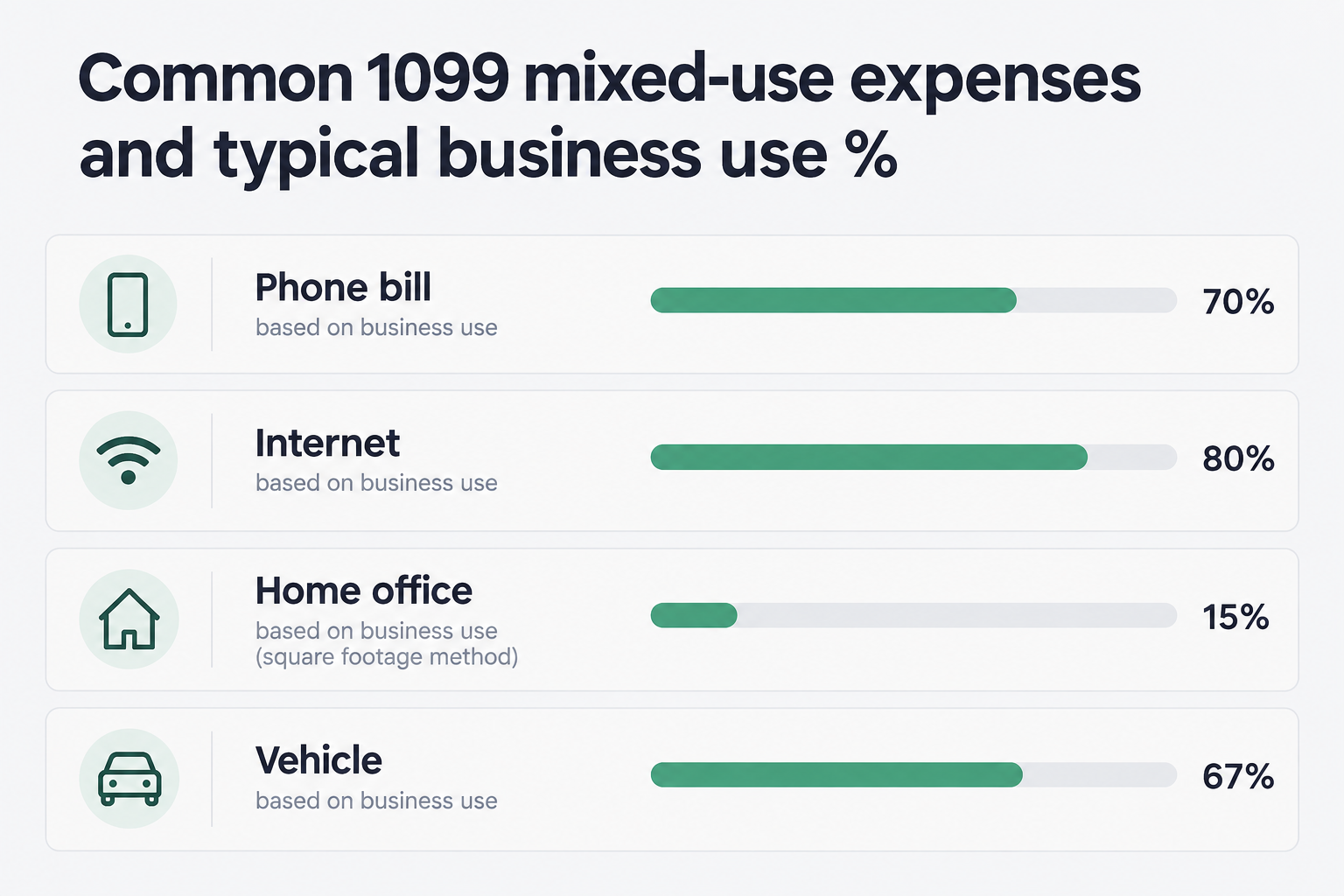
These examples illustrate the allocation math only. Your allocation must reflect your actual business use, supported by an appropriate method and records. Expense-specific eligibility rules and deduction limits also apply.
Expense | Example amount | Illustrative business-use allocation | Illustrative deductible amount |
|---|---|---|---|
Phone bill | $100/mo | 70% | $70 |
Internet | $80/mo | 80% | $64 |
Home office | $2,000/mo rent | 15% sq. footage (assuming a qualifying home office, actual-expense method; final deduction may be limited) | $300 allocated rent expense |
Vehicle | 12,000 mi/yr total | 66.7% (8,000 business miles out of 12,000) | Under the standard-mileage method, calculate by eligible business miles at the applicable rate per trip date |
The IRS does not require a separate account to claim these deductions. It requires documentation of the business purpose and the percentage applied - both of which live in your expense records, not your bank account type.
Which 1099 expenses cause the most confusion?
Three categories trip up most 1099 filers when they try to separate expenses manually.
Mixed-use expenses are costs you pay for both work and personal life. Your phone, internet connection, and home office are the clearest examples. The IRS allows a deduction for the business portion only. The problem is that most accounting tools either require a dedicated business account to capture these cleanly, or they force you to enter the split manually for every transaction - every month.
Split transactions contain both business and personal items - for example, office supplies and household groceries on the same receipt. Separate the items using the receipt rather than treating the entire purchase as deductible. Business meals have a different rule: an otherwise qualifying client meal, including your own meal, is generally subject to a 50% deduction limit. Unrelated personal purchases remain nondeductible.
100% business expenses buried in a personal account are the most straightforward type to handle, but the easiest to miss. Software subscriptions, professional memberships, and supplies purchased from the same card as your groceries all qualify - but only if they are tagged correctly before year end.
All three types require accurate tagging at the transaction level. Getting the split right without dedicated software means doing the math manually on every receipt or transaction.
How does AI categorization handle 1099 expense separation automatically?
SnapTax's AI categorization reads your bank statement and classifies each transaction as business or personal instantly. It works with any account - personal checking, personal credit card, or a dedicated business account if you have one. You do not need to pre-sort anything before uploading.
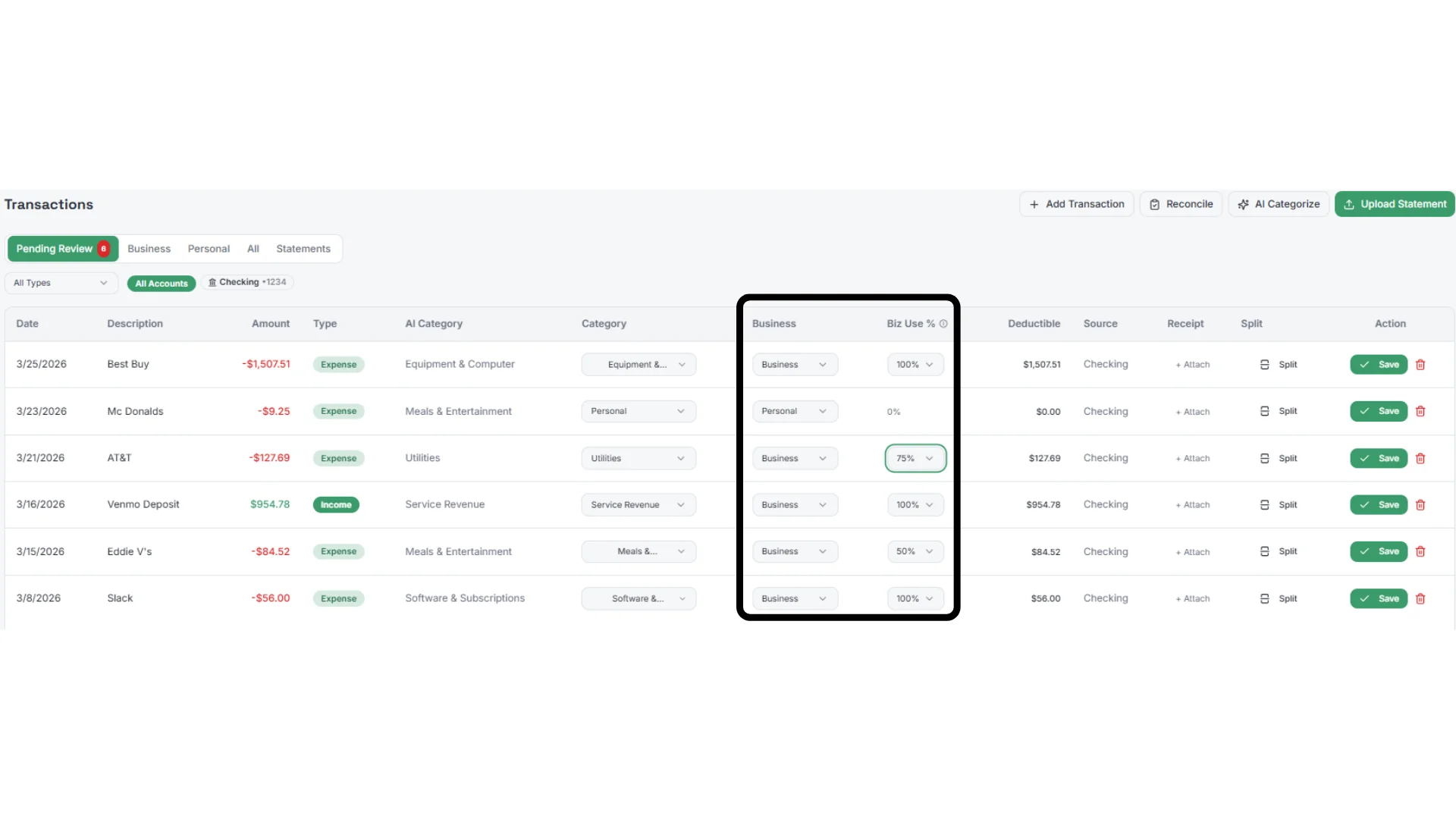
The AI recognizes merchant patterns. It knows that Slack is a software subscription. It knows that Amazon purchases could go either way. It applies freelancer-specific expense categories - the ones that appear directly on Schedule C - rather than generic accounting buckets. For mixed-use expenses, you set the business use percentage per transaction. The AT&T charge gets tagged at 75% business. Your home internet gets 80%. The software subscription gets 100%. SnapTax calculates the deductible amount for each based on the percentage you enter and feeds it directly into your Profit & Loss report and quarterly tax estimate in real time.
How do you separate 1099 expenses automatically, step by step?
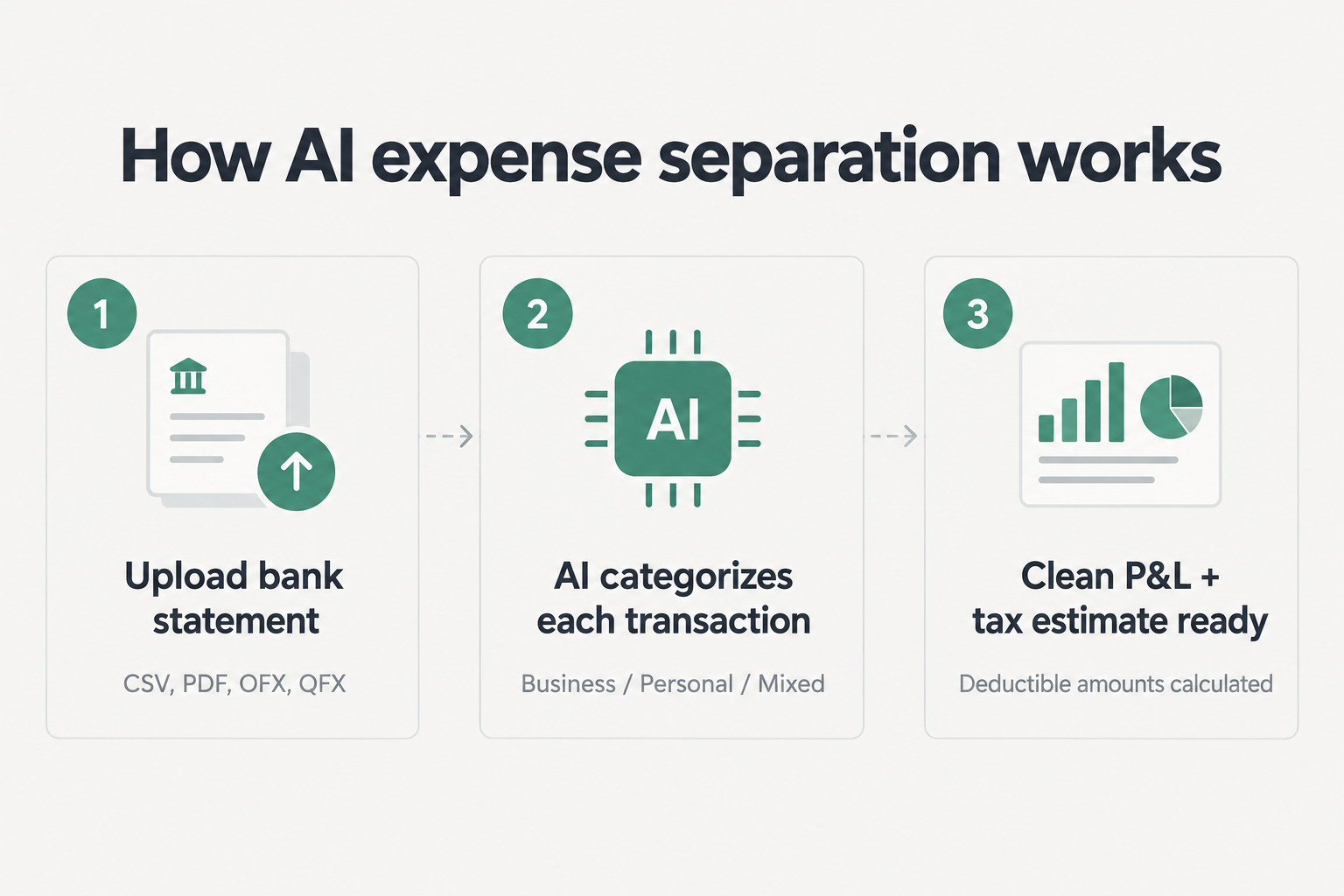
Here is the complete process from raw bank statement to audit-ready P&L, using a single personal checking account.
Step 1: Download your bank statement. Export a CSV, PDF, OFX, or QFX file from your bank's website. This works with any bank - Chase, Capital One, Wells Fargo, or a local credit union.
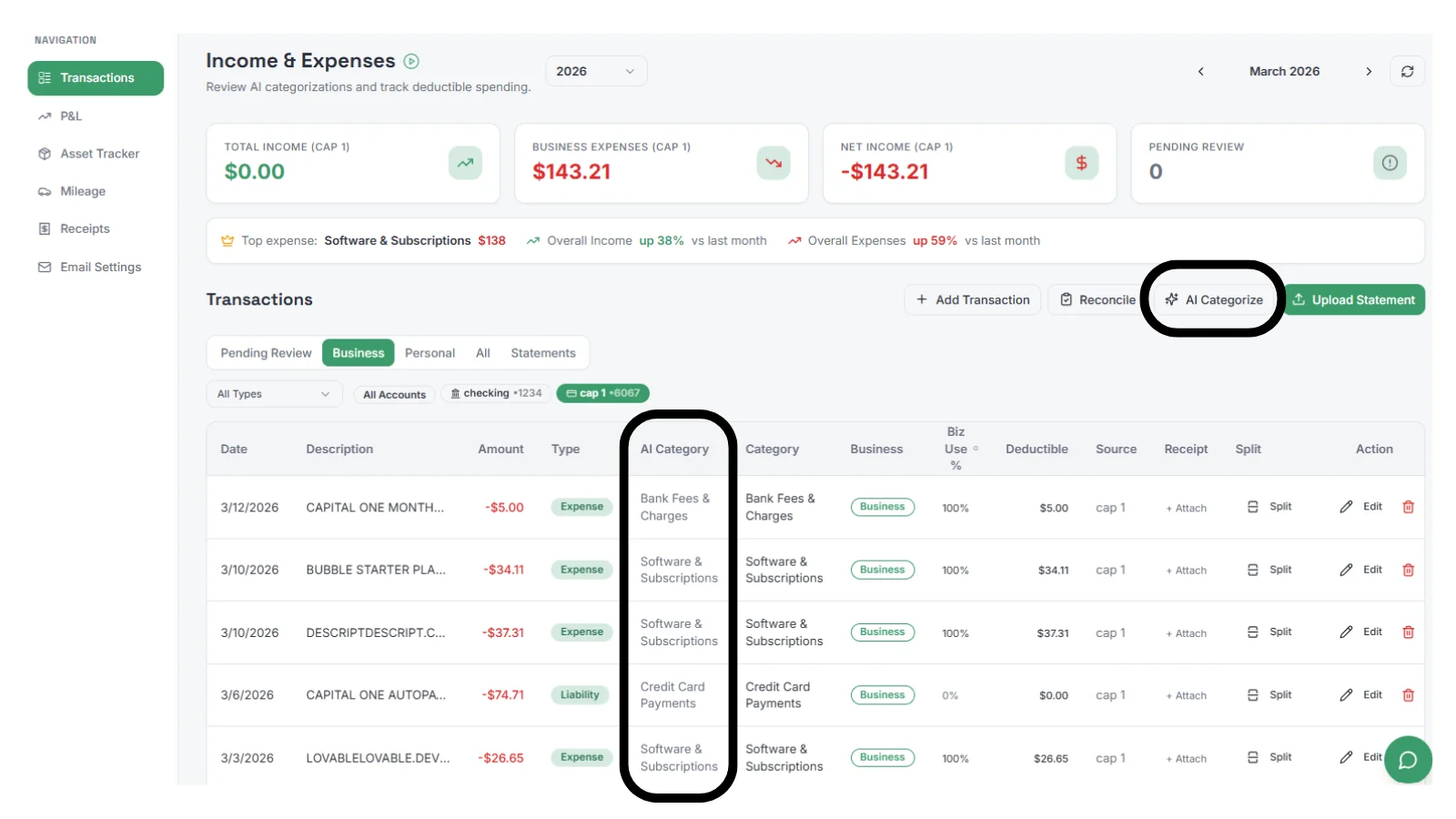
Step 2: Upload it to SnapTax. Drag the file into SnapTax. The app parses every transaction automatically and displays them in a sortable transaction list.
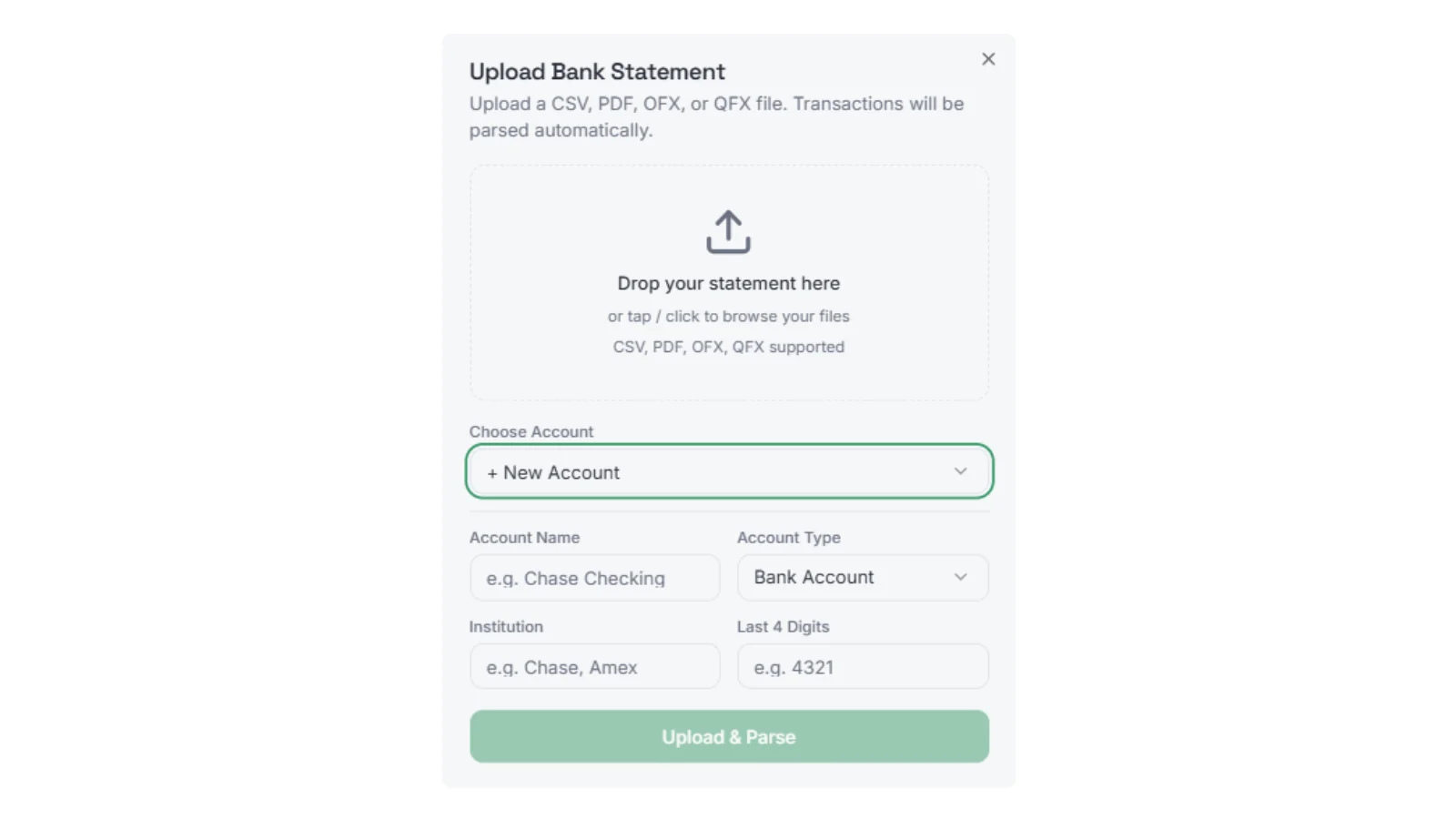
Step 3: Run AI categorization. Click "AI Categorize." The engine sorts each transaction into business or personal and assigns a category. Review every result and correct any that need adjusting - you are responsible for confirming each transaction's classification.
Step 4: Set business use percentages on mixed expenses. Update the Biz Use % field for any shared expense. Change AT&T from 100% to 75%. Set your internet to 80%. Mark the McDonald's lunch run as personal at 0%. SnapTax recalculates the deductible amount for each transaction instantly.
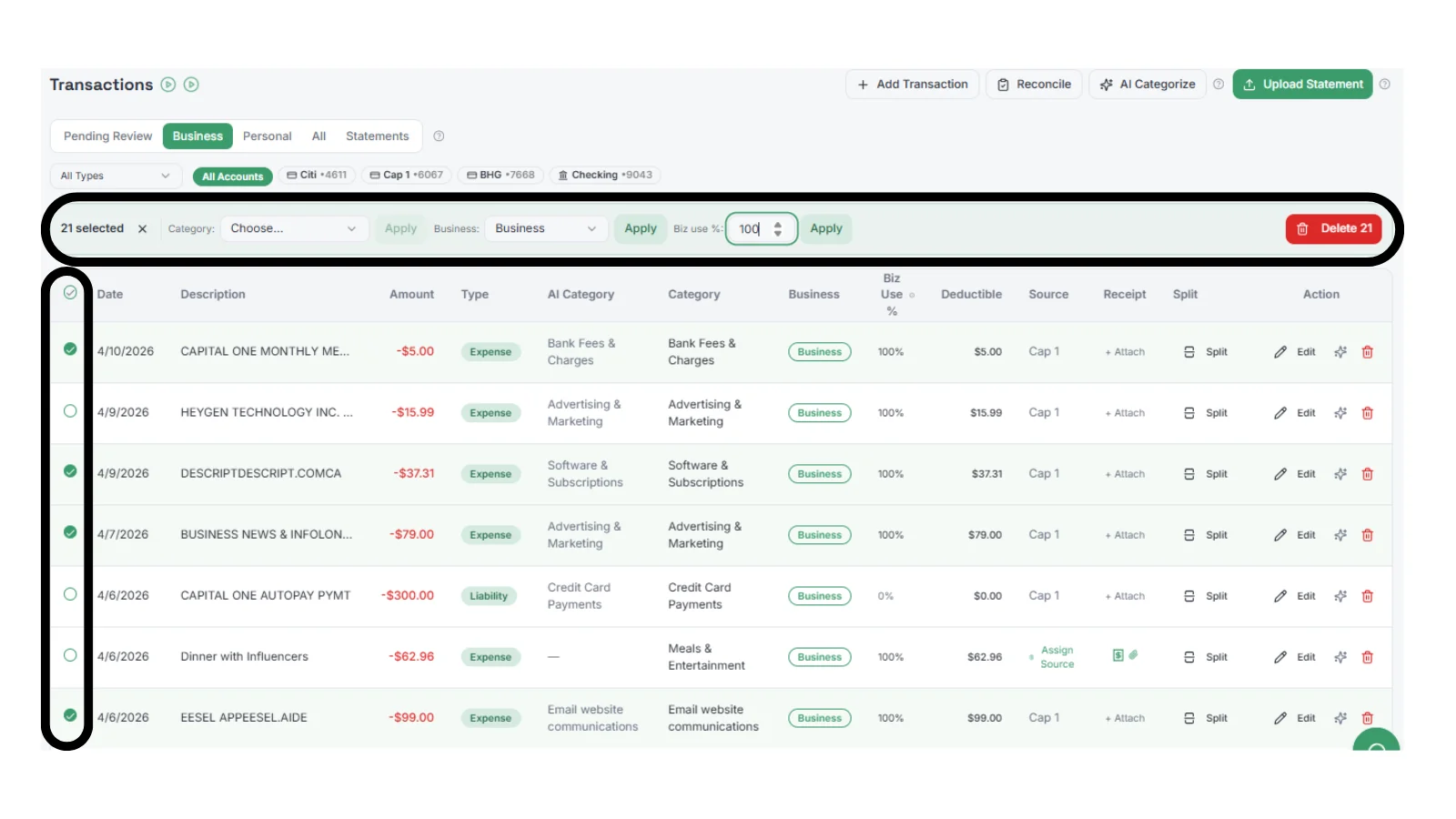
Step 5: Use bulk categorization for recurring software charges. Select all the Slack, Adobe, and similar software subscriptions at once. Apply "Business" and "100%" in a single action. SnapTax's bulk transaction categorization lets you update dozens of transactions in one step - no clicking through each one.
Step 6: Review your Profit & Loss report. SnapTax generates a P&L statement organized by expense category, with the business use percentage noted per transaction. This gives your accountant a structured summary of your reviewed transactions. Keep your supporting records - receipts, bank statements, and documentation of business purpose - separately, as the P&L organizes your records but does not replace them.
When does a separate business account actually make sense?
There are specific situations where opening a separate account is genuinely the right move.
You have formed an LLC. Many states require LLC members to maintain separation between business and personal funds to preserve liability protection. Commingling funds can be cited as a factor in piercing the corporate veil. Check your state's LLC statutes and consult an attorney if you are unsure what your structure requires.
Your transaction volume makes manual review burdensome. If you are processing a high number of transactions each month, a dedicated account reduces the total transactions you need to review and categorize.
Your clients require it. Some larger B2B clients or government contracts require vendor payments to go to a registered business account. Check your client agreements before deciding.
For a sole proprietor with straightforward finances, accurate categorization software covers what the IRS requires in terms of recordkeeping. Your bank's terms and your specific business structure may impose additional requirements beyond the tax rules.
Try SnapTax
SnapTax is built for freelancers and 1099 workers who want audit-ready deductions without the friction of maintaining a separate business account. Upload any bank statement - personal, business, or both - and the AI suggests business or personal classifications for each transaction, and you set the business use percentages on mixed-use items. SnapTax calculates the deductible amounts and generates an organized P&L report. The "Is This Deductible?" wizard gives you preliminary guidance on common expense questions right inside the app.
The Builder plan ($19.99/mo) includes AI categorization, business use percentage tracking, bulk transaction editing, and receipt management. Coming soon - currently in build: Customer and Vendor Tracking, Invoicing support and 1099 tracking, Liability Tracking and Balance Sheet support. A free tier is available for basic annual tax liability calculations. All trials require a credit card. No long-term contracts - cancel anytime.
Frequently Asked Questions
Do I need a separate bank account to deduct 1099 expenses?
No. The IRS does not require sole proprietors to maintain a separate business bank account. What matters is that you can prove each expense was for business. Modern tools like SnapTax let you upload any bank statement and tag the business use percentage of each transaction.
How do I separate business and personal expenses if I use one account?
Upload your bank statement to a tool that supports business use percentage tracking. For each transaction, mark it as business, personal, or assign a split percentage - for example, 75% business for your phone bill. The software calculates the deductible portion automatically. SnapTax's AI categorization handles the initial sort so you only need to review and adjust.
What is business use percentage and how does it apply to 1099 expenses?
Business use percentage is the share of a mixed-use expense that qualifies as a deduction. If you use your phone 70% for work, 70% of that bill is deductible. The IRS requires you to document this percentage for any expense shared between business and personal use. SnapTax lets you set this per transaction so the math is handled automatically.
Can AI automatically categorize 1099 expenses from a mixed account?
Yes. AI expense categorization tools read your bank statement and classify each transaction as business or personal based on merchant, category, and your spending patterns. You review and correct as needed, then set business use percentages on mixed-use expenses. SnapTax's AI categorization is built around freelancer-specific expense categories that map directly to Schedule C.
When does it actually make sense to open a separate business bank account?
A separate account makes sense if you have formed an LLC (many states require fund separation to preserve liability protection - check your state's rules), if your transaction volume is high enough that reviewing a mixed account is burdensome, or if larger clients or contracts require payments from a registered business account. For a sole proprietor with straightforward finances, accurate categorization software covers what the IRS requires for recordkeeping - but your bank terms and business structure may impose additional requirements.
Estimate your taxes free: Use the free 1099 tax calculator to see your self-employment tax, federal income tax, and quarterly payment in minutes.
